
Best Point of Sale Software in Saudi Arabia
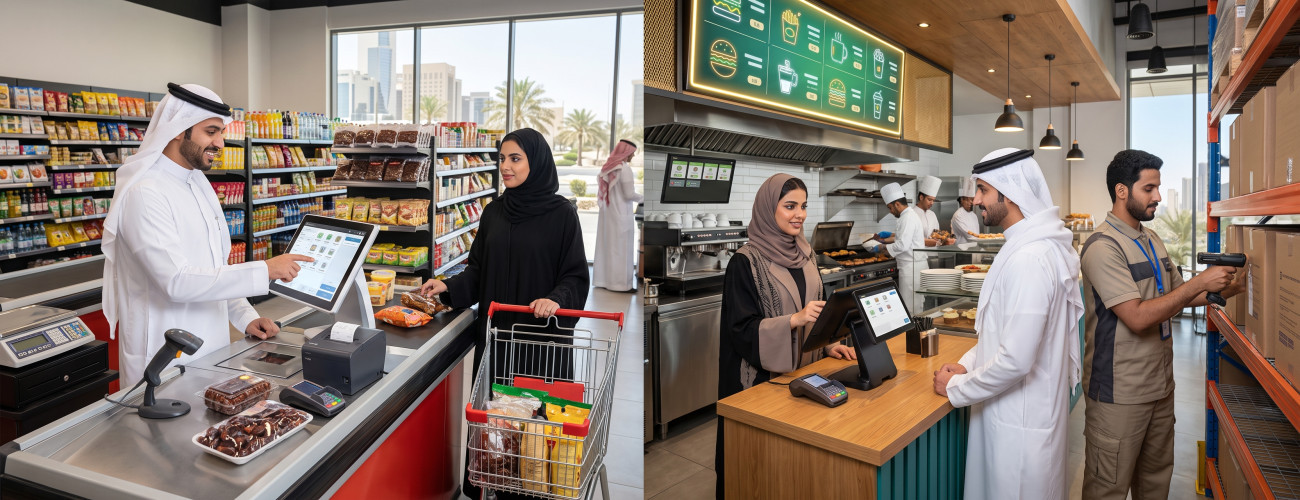
Choosing the best point of sale software is not limited to finding a fast cashier screen, because a POS system represents a link between sales, inventory, invoices, payment processes, employees, accounts, and reports. When these components work together, the business owner can track work details inside the store or branch instantly instead of manually collecting data at the end of the day.
The needs of the appropriate system vary depending on the nature of the business; a supermarket needs barcodes, scales, inventory management, and expiration dates, while a restaurant needs to organize orders, tables, the kitchen, and delivery. Establishments that manage multiple branches need unified reports, permissions, and tracking of sales and inventory movement across different locations.
Therefore, the most important question before purchasing the system is: What is the best point of sale software that suits the nature of my business? And not just: What is the most famous system in the POS market?
The point of sale system offers a set of functions that help link sales to inventory, returns, accounts, and reports within a single framework.
What is a POS Software?
A POS software is the solution used to record sales, issue invoices, accept payment methods, and process returns. Integrated systems can also update inventory balances, accounts, and reports immediately after executing the transaction.
When the cashier scans the barcode of a product, the system can execute a series of interconnected procedures:
- Identifying the product and its price.
- Adding the item to the invoice.
- Calculating the discount and tax according to the specified settings.
- Recording the payment method.
- Issuing the invoice.
- Deducting the sold quantity from the inventory.
- Recording the sales transaction.
- Updating reports.
- Recording the accounting impact when the POS system is connected to the accounting system.
From here, it is clear that a POS system is not limited to being a screen used by the cashier to complete a sale.
To learn more broadly about the components of this system, you can view the point of sale solution and its functions related to managing sales operations.
What makes a point of sale software the best?
The best point of sale software is one that can efficiently complete the sales process, link it to inventory, accounts, and reports, support electronic invoicing and the devices the business needs, in addition to providing appropriate permissions for each user.
Among the most prominent features to look for in the system:
Speed and Ease of the Sales Screen
The cashier interacts with the system many times during working hours, so it is essential that the sales screen is easy to use, responsive, and minimizes the number of steps required to complete an invoice.
It is important that the system supports:
- Touch screen.
- Quick product search.
- Barcode usage.
- Handling weights.
- Item shortcuts.
- Adding customer data.
- Applying discounts.
- Suspending an invoice when needed.
- Multiple payment methods.
- Processing returns.
Point of sale solutions provide sales screen functions including touch, barcode, search, handling weights, in addition to offers, vouchers, and return procedures linked to inventory.
You can learn about the features of the point of sale system and the functions it provides for managing sales operations.
Inventory Management from the Point of Sale
Inventory represents one of the most prominent differences between a limited cashier software and an integrated point of sale system.
When recording the sale of any product, its quantity in the system should be updated automatically, without the need to manually enter the change to the balance.
It is best for the POS system to include functions such as:
- Displaying available quantity.
- Managing multiple warehouses.
- Tracking item movement.
- Purchasing management.
- Supplier management.
- Transferring between warehouses.
- Executing inventory counts.
- Processing returns.
- Supporting multiple units per product.
- Multiple barcodes per item.
- Serial numbers when needed.
- Expiration dates for businesses that require them.
Integrated systems also support multiple units of measurement, barcodes, serial numbers, and expiration dates, with the ability to control quantity, price, and cost.
The importance of these functions increases in supermarkets, pharmacies, retail stores, and businesses that deal with large numbers of items.

Electronic Invoicing and Compliance with Saudi Requirements
For establishments subject to electronic invoicing requirements, the POS system used should be capable of issuing invoices in compliance with the applicable requirements.
The Zakat, Tax and Customs Authority (ZATCA) clarifies that the second phase of electronic invoicing requires notified taxpayers to integrate their invoicing systems with the "Fatoora" platform and issue electronic invoices in the required format.
Therefore, before choosing a POS system, you must ensure it supports:
- Tax invoice.
- Simplified tax invoice.
- Value Added Tax (VAT).
- QR Code.
- Credit and debit notes.
- Integration and linkage when the establishment is subject to the second phase.
Integrated solutions provide a system that combines point of sale, electronic invoicing, accounts, and inventory within a single environment.
Read also: Integrated Point of Sale System to learn about the functions related to managing sales and invoices.
Managing Payment Methods and Returns
A good POS software should cover the different stages of the sale, including the procedures that take place after issuing the invoice.
Important functions it should support include:
- Cash payment.
- Card payment.
- Payment methods adopted by the business.
- Splitting the payment amount when needed.
- Full return.
- Partial return.
- Discounts.
- Updating inventory when executing a return.
Integrated point of sale systems provide multiple payment methods, with the ability to save, print, and share the invoice, along with managing returns and adjustments.
Employees, Shifts, and Permissions
One of the fundamental questions the system must be able to answer is:
Who executed this transaction?
The business owner must be able to distribute permissions according to the nature of each user's role, such as cashier, supervisor, accountant, and manager.
Examples of controllable permissions:
- Applying discounts.
- Executing return operations.
- Viewing costs.
- Changing prices.
- Opening the cash drawer.
- Viewing profits.
- Canceling transactions.
- Accessing reports.
Shift information also helps in reconciling sales with cash and identifying the employee responsible for the set of transactions that occurred during the shift, which are well-known functions in modern POS systems.
Sales and Profit Reports
The best point of sale software doesn't just show "how much were today's sales?", but helps management know what products were sold, where they were sold, and what generates the highest return.
Among the important reports that should be available:
- Total sales value.
- Sales by branch.
- Sales by employee.
- Item sales.
- Return operations.
- Discounts.
- Payment methods.
- Inventory movement.
- Best-selling items.
- Most profitable items.
- Customer balances when there are credit sales.
Integrated systems provide financial and accounting reports, with analysis of sales, profits, and items, and tracking of inventory and product movement, in addition to dashboards that help monitor performance.
If management requires more comprehensive analysis, you can view the reporting and performance tracking solutions.
Point of Sale Hardware Support
Before purchasing the software, it is essential to ensure its ability to work with your available hardware or the hardware you intend to use in the future.
Among the hardware you may need it to support:
- Cash drawer.
- Customer display screen.
- Thermal printer.
- Barcode scanner.
- Card reader.
- Touch screen.
- Electronic scale.
Point of sale solutions support these categories of hardware, including printers, barcode scanners, customer screens, and scales.
If you are looking for an integrated cashier device, you can book a consultation to learn about the right solution for your needs.
Best Point of Sale Software by Business Type
The same settings cannot be applied to all businesses, because the nature of work and operational needs vary from one sector to another.
Best Point of Sale Software for Supermarkets and Retail Stores
Focus should be on:
- Speed of executing cashier operations.
- Barcode usage.
- Scale support.
- Offers management.
- Discounts.
- Expiration dates.
- Inventory management.
- Multiple item units.
- Supplier management.
- Inventory counting operations.
Advanced point of sale systems include functions that suit these operations, such as integration with electronic scales, barcodes, and managing expiration dates, offers, and inventory.

Best Point of Sale Software for Restaurants and Cafes
A restaurant needs functions that go beyond the traditional sales process, including:
- Dine-in and table management.
- Order organization.
- Takeaway orders.
- Delivery management.
- Kitchen.
- Splitting the order.
- Recipe management.
- Inventory.
- Calculating ingredient costs.
Managing orders, employees, inventory, and multiple branches are among the essential functions that the restaurant and cafe sector cares about when choosing a system.
Therefore, you can rely on a restaurant and cafe management system instead of settling for a generic sales screen.
Point of Sale for Multi-Branch Companies
When an establishment owns more than one branch, the main priorities become:
- Standardizing product and pricing lists.
- Tracking sales for each branch.
- Knowing the inventory at each location.
- Executing product transfers.
- Managing user permissions.
- Obtaining consolidated reports.
- Tracking performance from anywhere.
Establishments that need to manage their operations online can benefit from cloud solutions that allow accessing and tracking business data remotely.
Why is a point of sale system considered a strong option when searching for the best point of sale software?
A point of sale system can be considered a suitable choice when searching for the best point of sale software in Saudi Arabia for businesses that want to link cashier operations with accounting, inventory, and reports instead of running a standalone sales software.
Functions the system should provide include:
- Touch-operated POS screen.
- Barcode and weight support.
- Offers and discounts.
- Returns management.
- Product management.
- Multiple units and barcodes.
- Expiration dates.
- Inventory and warehouse management.
- Supplier management.
- Multiple payment methods.
- Financial reports.
- Sales and profit analysis.
- Support for various point of sale hardware.
The importance of integration highlights that the sales process is not confined to the cashier screen, but becomes part of the establishment's financial and inventory cycle.
You can review the point of sale and operations management system and compare its functions with your business needs before making a purchasing decision.
How to test a point of sale software before purchasing?
Do not just look at system images or read the features list, but run a trial that simulates the nature of an actual working day:
- Enter a product into the system.
- Scan the barcode.
- Create a sales invoice.
- Add a discount.
- Execute payment using two different methods.
- Execute a partial return operation.
- Check the inventory balance.
- Close the cashier shift.
- Extract the sales report.
- Review the accounting impact.
- Test the permissions of a different user.
- Try the printer, barcode, and the actual device you will use.
Ready to try the system?
Start your free trial or speak with the sales team to help you choose the right solution.
Frequently Asked Questions about the Best Point of Sale Software
What is the best point of sale software?
The best point of sale software is one that matches the nature of your business and links sales to inventory, invoices, payment methods, returns, and reports, while providing the hardware and permissions the establishment needs.
The point of sale system is worth evaluating by businesses looking to combine POS operations, inventory, and accounting within one system.
What is the difference between point of sale software and point of sale hardware?
Point of sale software is the system responsible for managing products, invoices, inventory, and reports, while the point of sale hardware is the screen or cashier device through which the software is operated.
You can book a consultation to learn about the right solution in terms of software and hardware.
Should the POS software be linked to inventory?
If the business relies on selling products, it is better to have a direct link to the inventory so that quantities are updated when a sale or return is executed, with the ability to track the balance and item movement without manual entries.
Does POS need separate accounting software?
Not necessarily, as an integrated system can combine point of sale and accounting. This represents one of the main differences between a simple cashier software and a comprehensive system.
Must the best point of sale software support electronic invoicing?
If the establishment is subject to electronic invoicing requirements, an invoicing solution compliant with the applicable requirements must be used, including integration with the Fatoora platform when the establishment enters the second phase.
Can point of sale be operated in more than one branch?
Advanced systems allow managing more than one store or branch and tracking inventory, employees, and sales, but the scope of available functions varies from one system to another.
What is the cost of point of sale software?
The cost is affected by several factors, such as the number of branches, users, points of sale, warehouses, devices, functions, and integrations. Therefore, it is better to compare the total cost of ownership instead of focusing solely on the license value.
You can view the packages and pricing and compare the available options before making a decision.
Conclusion
Choosing the best point of sale software begins with understanding the workflow within your business. A supermarket needs barcodes, scales, inventory, and expiration dates, while a restaurant needs to manage orders, the kitchen, and tables. A company that owns multiple branches needs centralized tracking, reports, and clear permissions.
In various cases, the value of a POS system increases when the invoice is directly linked to inventory, accounts, returns, and reports instead of managing each aspect through standalone software.
Integrated point of sale systems provide a framework that combines sales, accounting, inventory, managing products, suppliers, warehouses, and reports, with support for a variety of POS devices.
You can review the point of sale system or check out the restaurant and cafe management system, then register and get the free trial and experience a real sales cycle including the invoice, barcode, return, inventory, and report before adopting the system.
Start Managing Your Business with Complete Flexibility
Try Aamal Raqmia for free. Start issuing your ZATCA-compliant electronic invoices in minutes.