
Offline POS Software: How Does It Work and What Are Its Benefits?
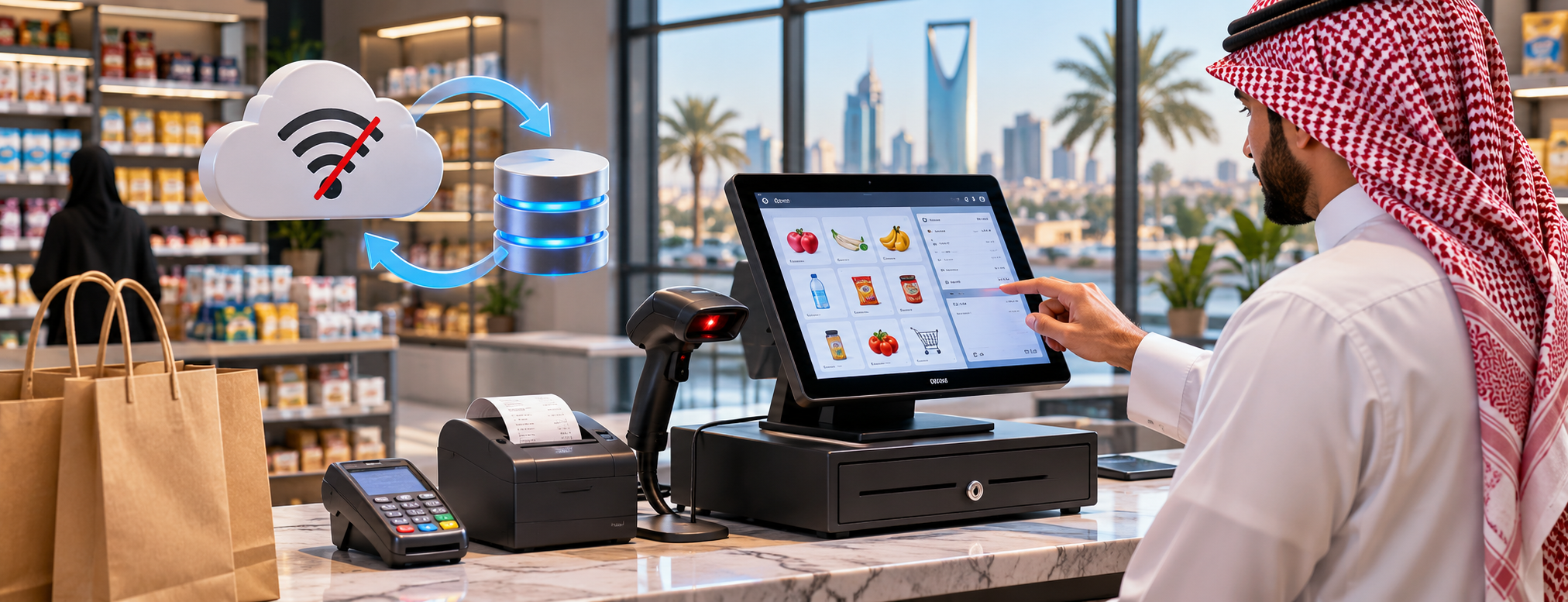
Many business owners in Saudi Arabia are looking for offline POS software to help organize sales and reduce everyday mistakes. However, choosing the right system requires understanding the nature of the business, the number of devices and branches, product turnover, and invoicing requirements. Not every cloud-based system can process sales without an internet connection. You need to verify which operations continue locally and which stop until the connection is restored. This guide explains how to evaluate the options and which steps are worth testing before subscribing, with operational examples and practical questions to ask the solution provider.
There is no single answer that suits every store. One business may prioritize fast invoicing, while another may prioritize accurate stocktaking or branch management. It is important to distinguish between what the software can theoretically provide and what employees can actually carry out. For that reason, we focus on criteria that can be verified rather than broad claims such as 'best' or 'approved' without evidence.
Offline vs. Cloud-Based POS Systems
When assessing the difference between offline and cloud-based systems in the context of offline operations, start with what actually happens during day-to-day work, not what appears in a sales presentation. This aspect relates to how offline POS software turns employees' daily actions into clear data that can be reviewed. If a process is repeated dozens of times, even a small complication can lead to wasted time or discrepancies between records. It is therefore useful to document your current workflow, identify where delays or errors occur, and compare it with how the proposed system works.
Consider a practical example: a retail store experiences intermittent internet outages and wants to keep recording sales. In this case, it is not enough for the provider to say that the system offers the difference between offline and cloud-based systems; you need to run a test that starts with entering data and ends with checking its effect on the invoice, item quantity, or relevant report. Ask the employee who will perform the task to test it personally, because ease of use cannot be measured by the number of buttons or the appearance of the screen alone. Record the results and your observations so you can compare more than one solution without relying on first impressions.
If you want to evaluate the available options, you can explore plans and pricing, then confirm the available service details and how well they meet your establishment’s needs.
What Keeps Working During an Internet Outage?
When assessing what continues to work during an outage in the context of offline operations, start with what actually happens during day-to-day work, not what appears in a sales presentation. This aspect relates to how offline POS software turns employees' daily actions into clear data that can be reviewed. If a process is repeated dozens of times, even a small complication can lead to wasted time or discrepancies between records. It is therefore useful to document your current workflow, identify where delays or errors occur, and compare it with how the proposed system works.
Consider a practical example: a retail store experiences intermittent internet outages and wants to keep recording sales. In this case, it is not enough for the provider to say that the system offers what continues to work during an outage; you need to run a test that starts with entering data and ends with checking its effect on the invoice, item quantity, or relevant report. Ask the employee who will perform the task to test it personally, because ease of use cannot be measured by the number of buttons or the appearance of the screen alone. Record the results and your observations so you can compare more than one solution without relying on first impressions.
To explore options related to this topic, review accounting and point-of-sale solutions, then confirm the available service details and how well they meet your establishment’s needs.
Saving Invoices Locally
When assessing saving invoices locally in the context of offline operations, start with what actually happens during day-to-day work, not what appears in a sales presentation. This aspect relates to how offline POS software turns employees' daily actions into clear data that can be reviewed. If a process is repeated dozens of times, even a small complication can lead to wasted time or discrepancies between records. It is therefore useful to document your current workflow, identify where delays or errors occur, and compare it with how the proposed system works.
Consider a practical example: a retail store experiences intermittent internet outages and wants to keep recording sales. In this case, it is not enough for the provider to say that the system offers saving invoices locally; you need to run a test that starts with entering data and ends with checking its effect on the invoice, item quantity, or relevant report. Ask the employee who will perform the task to test it personally, because ease of use cannot be measured by the number of buttons or the appearance of the screen alone. Record the results and your observations so you can compare more than one solution without relying on first impressions.
Limitations of Payment Methods
When assessing payment-method limitations in the context of offline operations, start with what actually happens during day-to-day work, not what appears in a sales presentation. This aspect relates to how offline POS software turns employees' daily actions into clear data that can be reviewed. If a process is repeated dozens of times, even a small complication can lead to wasted time or discrepancies between records. It is therefore useful to document your current workflow, identify where delays or errors occur, and compare it with how the proposed system works.
Consider a practical example: a retail store experiences intermittent internet outages and wants to keep recording sales. In this case, it is not enough for the provider to say that the system offers payment-method limitations; you need to run a test that starts with entering data and ends with checking its effect on the invoice, item quantity, or relevant report. Ask the employee who will perform the task to test it personally, because ease of use cannot be measured by the number of buttons or the appearance of the screen alone. Record the results and your observations so you can compare more than one solution without relying on first impressions.
If you want to evaluate the available options, you can book a demonstration tailored to your business, then confirm the available service details and how well they meet your establishment’s needs.
Risks of Duplicate Invoices
When assessing the risk of duplicate invoices in the context of offline operations, start with what actually happens during day-to-day work, not what appears in a sales presentation. This aspect relates to how offline POS software turns employees' daily actions into clear data that can be reviewed. If a process is repeated dozens of times, even a small complication can lead to wasted time or discrepancies between records. It is therefore useful to document your current workflow, identify where delays or errors occur, and compare it with how the proposed system works.
Consider a practical example: a retail store experiences intermittent internet outages and wants to keep recording sales. In this case, it is not enough for the provider to say that the system offers the risk of duplicate invoices; you need to run a test that starts with entering data and ends with checking its effect on the invoice, item quantity, or relevant report. Ask the employee who will perform the task to test it personally, because ease of use cannot be measured by the number of buttons or the appearance of the screen alone. Record the results and your observations so you can compare more than one solution without relying on first impressions.
From a management perspective, ask about permissions for editing data, the ability to retrieve previous transactions, and how errors are corrected after a shift is closed or a document is approved. You should also find out whether this function is included in the basic plan or requires separate configuration or an add-on. If the business has multiple branches, check whether information is available both by branch and for the business as a whole. Remember that a function's presence in the software does not necessarily mean it is enabled or suited to your procedures without configuration.
To explore options related to this topic, review the purchasing management system, then confirm the available service details and how well they meet your establishment’s needs.
Synchronizing Data After Reconnection
When assessing data synchronization after reconnecting in the context of offline operations, start with what actually happens during day-to-day work, not what appears in a sales presentation. This aspect relates to how offline POS software turns employees' daily actions into clear data that can be reviewed. If a process is repeated dozens of times, even a small complication can lead to wasted time or discrepancies between records. It is therefore useful to document your current workflow, identify where delays or errors occur, and compare it with how the proposed system works.
Consider a practical example: a retail store experiences intermittent internet outages and wants to keep recording sales. In this case, it is not enough for the provider to say that the system offers data synchronization after reconnecting; you need to run a test that starts with entering data and ends with checking its effect on the invoice, item quantity, or relevant report. Ask the employee who will perform the task to test it personally, because ease of use cannot be measured by the number of buttons or the appearance of the screen alone. Record the results and your observations so you can compare more than one solution without relying on first impressions.
Handling Price Changes
When assessing handling price changes in the context of offline operations, start with what actually happens during day-to-day work, not what appears in a sales presentation. This aspect relates to how offline POS software turns employees' daily actions into clear data that can be reviewed. If a process is repeated dozens of times, even a small complication can lead to wasted time or discrepancies between records. It is therefore useful to document your current workflow, identify where delays or errors occur, and compare it with how the proposed system works.
Consider a practical example: a retail store experiences intermittent internet outages and wants to keep recording sales. In this case, it is not enough for the provider to say that the system offers handling price changes; you need to run a test that starts with entering data and ends with checking its effect on the invoice, item quantity, or relevant report. Ask the employee who will perform the task to test it personally, because ease of use cannot be measured by the number of buttons or the appearance of the screen alone. Record the results and your observations so you can compare more than one solution without relying on first impressions.
From a management perspective, ask about permissions for editing data, the ability to retrieve previous transactions, and how errors are corrected after a shift is closed or a document is approved. You should also find out whether this function is included in the basic plan or requires separate configuration or an add-on. If the business has multiple branches, check whether information is available both by branch and for the business as a whole. Remember that a function's presence in the software does not necessarily mean it is enabled or suited to your procedures without configuration.
If you want to evaluate the available options, you can review subscription options, then confirm the available service details and how well they meet your establishment’s needs.
Inventory During an Outage
When assessing inventory during an outage in the context of offline operations, start with what actually happens during day-to-day work, not what appears in a sales presentation. This aspect relates to how offline POS software turns employees' daily actions into clear data that can be reviewed. If a process is repeated dozens of times, even a small complication can lead to wasted time or discrepancies between records. It is therefore useful to document your current workflow, identify where delays or errors occur, and compare it with how the proposed system works.
Consider a practical example: a retail store experiences intermittent internet outages and wants to keep recording sales. In this case, it is not enough for the provider to say that the system offers inventory during an outage; you need to run a test that starts with entering data and ends with checking its effect on the invoice, item quantity, or relevant report. Ask the employee who will perform the task to test it personally, because ease of use cannot be measured by the number of buttons or the appearance of the screen alone. Record the results and your observations so you can compare more than one solution without relying on first impressions.
To explore options related to this topic, review accounting and point-of-sale solutions, then confirm the available service details and how well they meet your establishment’s needs.
Electronic Invoicing and Compliance Obligations
When assessing electronic invoicing and compliance obligations in the context of offline operations, start with what actually happens during day-to-day work, not what appears in a sales presentation. This aspect relates to how offline POS software turns employees' daily actions into clear data that can be reviewed. If a process is repeated dozens of times, even a small complication can lead to wasted time or discrepancies between records. It is therefore useful to document your current workflow, identify where delays or errors occur, and compare it with how the proposed system works.
Consider a practical example: a retail store experiences intermittent internet outages and wants to keep recording sales. In this case, it is not enough for the provider to say that the system offers electronic invoicing and compliance obligations; you need to run a test that starts with entering data and ends with checking its effect on the invoice, item quantity, or relevant report. Ask the employee who will perform the task to test it personally, because ease of use cannot be measured by the number of buttons or the appearance of the screen alone. Record the results and your observations so you can compare more than one solution without relying on first impressions.

From a management perspective, ask about permissions for editing data, the ability to retrieve previous transactions, and how errors are corrected after a shift is closed or a document is approved. You should also find out whether this function is included in the basic plan or requires separate configuration or an add-on. If the business has multiple branches, check whether information is available both by branch and for the business as a whole. Remember that a function's presence in the software does not necessarily mean it is enabled or suited to your procedures without configuration.
Testing an Unexpected Internet Outage
When assessing testing a sudden outage in the context of offline operations, start with what actually happens during day-to-day work, not what appears in a sales presentation. This aspect relates to how offline POS software turns employees' daily actions into clear data that can be reviewed. If a process is repeated dozens of times, even a small complication can lead to wasted time or discrepancies between records. It is therefore useful to document your current workflow, identify where delays or errors occur, and compare it with how the proposed system works.
Consider a practical example: a retail store experiences intermittent internet outages and wants to keep recording sales. In this case, it is not enough for the provider to say that the system offers testing a sudden outage; you need to run a test that starts with entering data and ends with checking its effect on the invoice, item quantity, or relevant report. Ask the employee who will perform the task to test it personally, because ease of use cannot be measured by the number of buttons or the appearance of the screen alone. Record the results and your observations so you can compare more than one solution without relying on first impressions.
If you want to evaluate the available options, you can discuss your requirements in a live demonstration, then confirm the available service details and how well they meet your establishment’s needs.
Hardware and Backups
When assessing hardware and backups in the context of offline operations, start with what actually happens during day-to-day work, not what appears in a sales presentation. This aspect relates to how offline POS software turns employees' daily actions into clear data that can be reviewed. If a process is repeated dozens of times, even a small complication can lead to wasted time or discrepancies between records. It is therefore useful to document your current workflow, identify where delays or errors occur, and compare it with how the proposed system works.
Consider a practical example: a retail store experiences intermittent internet outages and wants to keep recording sales. In this case, it is not enough for the provider to say that the system offers hardware and backups; you need to run a test that starts with entering data and ends with checking its effect on the invoice, item quantity, or relevant report. Ask the employee who will perform the task to test it personally, because ease of use cannot be measured by the number of buttons or the appearance of the screen alone. Record the results and your observations so you can compare more than one solution without relying on first impressions.
From a management perspective, ask about permissions for editing data, the ability to retrieve previous transactions, and how errors are corrected after a shift is closed or a document is approved. You should also find out whether this function is included in the basic plan or requires separate configuration or an add-on. If the business has multiple branches, check whether information is available both by branch and for the business as a whole. Remember that a function's presence in the software does not necessarily mean it is enabled or suited to your procedures without configuration.
To explore options related to this topic, review distribution solutions, then confirm the available service details and how well they meet your establishment’s needs.
Questions to Ask the Provider Before Subscribing
When assessing questions to ask the provider before subscribing in the context of offline operations, start with what actually happens during day-to-day work, not what appears in a sales presentation. This aspect relates to how offline POS software turns employees' daily actions into clear data that can be reviewed. If a process is repeated dozens of times, even a small complication can lead to wasted time or discrepancies between records. It is therefore useful to document your current workflow, identify where delays or errors occur, and compare it with how the proposed system works.
Consider a practical example: a retail store experiences intermittent internet outages and wants to keep recording sales. In this case, it is not enough for the provider to say that the system offers questions to ask the provider before subscribing; you need to run a test that starts with entering data and ends with checking its effect on the invoice, item quantity, or relevant report. Ask the employee who will perform the task to test it personally, because ease of use cannot be measured by the number of buttons or the appearance of the screen alone. Record the results and your observations so you can compare more than one solution without relying on first impressions.
A Practical Checklist Before Approving the System
• Define your goal for offline POS software in one measurable sentence, such as reducing the time needed to record a sale or improving the accuracy of inventory reports.
• Count your POS terminals, devices, users, and branches, and anticipate expansion over the coming year rather than considering only the current situation.
• Run at least five test transactions: a normal sale, a discount, a return, a change of payment method, and an end-of-shift report.
• Ask about data exports, backups, the change log, and technical-support response times. Request written answers when entering into a contract.
• Review the total operating cost, including devices, training, integration, subscriptions, and add-ons. Do not compare advertised prices alone.
How Can You Use Nezami’s Service Pages?
The Nezami website provides introductory pages for a variety of software solutions. Use these pages as a starting point to understand the scope of each service, then ask for direct clarification of any essential feature before making a purchasing decision. It would be inaccurate to assume that every feature mentioned in this guide is automatically available in every plan or for every business activity.
To explore options related to this topic, review accounting and point-of-sale solutions, then confirm the available service details and how well they meet your establishment’s needs.
To explore options related to this topic, review the purchasing management system, then confirm the available service details and how well they meet your establishment’s needs.
To explore options related to this topic, review distribution solutions, then confirm the available service details and how well they meet your establishment’s needs.
To explore options related to this topic, review accounting and point-of-sale solutions, then confirm the available service details and how well they meet your establishment’s needs.
To explore options related to this topic, review the purchasing management system, then confirm the available service details and how well they meet your establishment’s needs.
To explore options related to this topic, review accounting and point-of-sale solutions, then confirm the available service details and how well they meet your establishment’s needs.
Ready to Try the System?
Start your free trial or speak with the sales team for help choosing the right solution.
Frequently Asked Questions
How do I choose offline POS software that suits my business?
Start with your most frequent operations, define the essential requirements, then test invoices, returns, reports, and integrations before subscribing.
Is a permanent internet connection necessary?
That depends on how the system is designed. Ask which functions work offline and how synchronization takes place after the network returns; do not assume that offline operation is supported automatically.
Is a POS system enough to manage accounting?
Not always. The business may need a complete accounting system or suitable integration to post transactions, reconcile payments, and review accounts.
How can I verify electronic invoicing requirements?
Consult the Zakat, Tax and Customs Authority to verify which requirements apply to your establishment, and ask the provider to specify the scope of compliance its system supports.
What is the most important step before signing a contract?
Test real sales scenarios with your employees, review total costs, support, and scalability, and document your findings before choosing.
Conclusion
A sound decision about offline POS software starts with the business's needs, not a list of features. Focus on testing actual procedures, reviewing integration with accounting and inventory, and confirming user permissions, reports, costs, and support. Where regulatory requirements apply, rely on current official information before publishing or operating the system. The aim is to build an organized sales process that can be monitored and developed as the business grows.
Once your requirements are clear, you can start registering with Nezami, then confirm the available service details and how well they meet your establishment’s needs.
Start Managing Your Business with Complete Flexibility
Try Aamal Digital for free. Start issuing electronic invoices that comply with ZATCA requirements in minutes.