
Point of Sale: Your Guide to Choosing the Best POS Software for Your Business
Point of Sale: Your Guide to Choosing the Best POS Software for Your Business
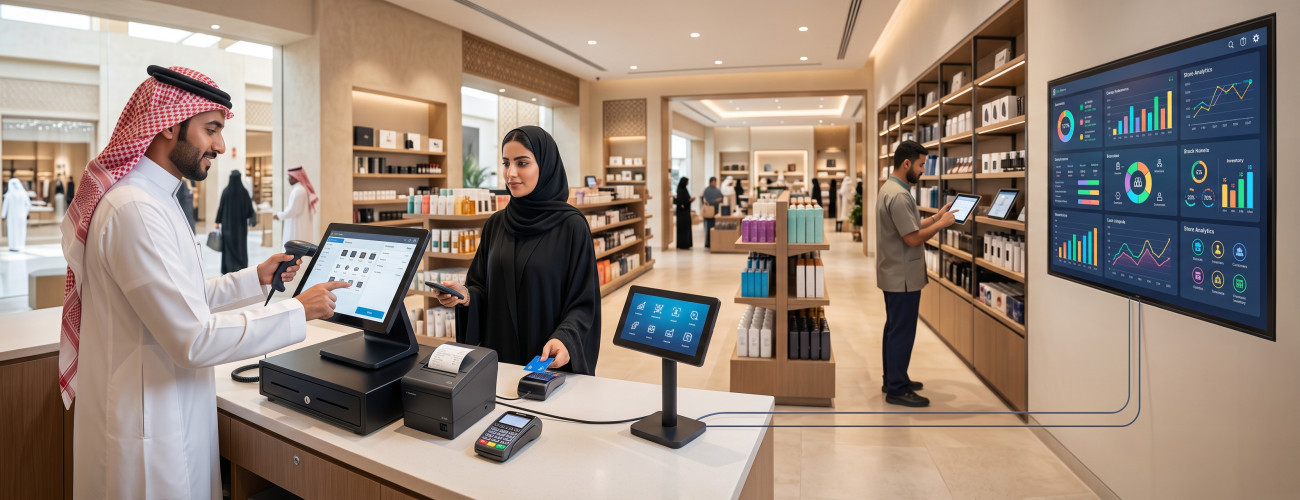
Point of Sale (POS) is no longer limited to being a cashier machine used merely to calculate the value of purchases and issue invoices. It has evolved into an interconnected system that links sales, inventory, accounts, customers, branches, payment methods, and reports. By recording a single sales transaction, the system can update product balances, calculate taxes, determine the payment method, save invoice data, and reflect the transaction in sales, shift, and branch reports.
The need for a POS system becomes more apparent as a business grows, product lines and staff expand, or discrepancies in inventory and cash start to appear. Relying on a limited or unsuitable software can slow down sales operations, cause price inconsistencies, complicate payment reconciliations, and obscure actual profit margins.
This guide reviews the concept of point of sale, how a POS software works, its components and types, the key features it must have, and how it integrates with accounting, inventory, and e-invoicing. It also highlights the criteria that help in choosing the best POS software for stores, restaurants, and companies in Saudi Arabia.
What is a Point of Sale (POS)?
Point of sale refers to the systems and hardware used to complete the sale of a product or service, record transaction details, collect payments, and issue related invoices.
POS stands for Point of Sale. It can refer to the physical location where a customer pays for their purchases, such as a cashier counter, but the concept today encompasses an integrated ecosystem that includes:
- Sales management software.
- Cashier machine.
- Barcode scanner.
- Receipt printer.
- Cash drawer.
- Customer display screen.
- Electronic payment terminal.
- Products and pricing database.
- Inventory management.
- Reports and accounting.
POS software transforms the sales process into an electronic record that can be tracked and referenced. Instead of manually entering prices and calculating totals, the system retrieves product data, applies taxes and discounts, records the payment method, and issues the invoice.
In general, POS systems are software solutions that combine the hardware and software necessary to record transactions, collect payments, track inventory, issue invoices, and generate reports.
How Does a POS System Work?
A point of sale system works by recording order details and then executing a series of interconnected actions immediately after the invoice is approved.
Typically, the sales process goes through the following stages:
- The cashier logs into the system using their account.
- Scans the product barcode or searches for it using the name or code.
- The system displays the price, tax, and available quantity.
- The employee adds the requested products or services to the invoice.
- The system applies permitted offers and discounts.
- The customer or employee selects the payment method.
- The system issues the invoice.
- Deducts the sold quantity from the inventory.
- Records the transaction within the branch and shift sales.
- The system posts the accounting impact of the transaction if integrated with an accounting system.
While these steps may seem straightforward, the system's efficiency lies in how it handles the details. For instance, when executing a return, it shouldn't just refund the money; it must return the quantity to inventory if it's sellable, while recording the impact of the return on sales, taxes, payment methods, and the customer's account.
When executing a credit sale, the system records the value in the customer's account instead of calculating it as cash in the drawer. If multiple payment methods are used for the same invoice, the value must be accurately distributed across cash, cards, bank transfers, and other methods.
Components of a POS System
A point of sale system consists of software that manages operations and the hardware relied upon by the employee and customer during the sales process.
POS Software
The POS software is the part responsible for storing and managing data related to products, customers, prices, sales, users, and reports.
Its key tasks include:
- Issuing sales invoices.
- Searching for products and reading barcodes.
- Managing prices and discounts.
- Handling multiple payment methods.
- Recording return transactions.
- Opening and closing shifts.
- Managing user permissions.
- Updating inventory data.
- Monitoring branch performance levels.
- Generating sales reports.
- Integrating with the accounting system.
- Supporting e-invoicing when required.
The capabilities of POS software vary from one system to another; some are limited to issuing invoices, while others offer interconnected management of sales, inventory, purchases, customers, and accounting.
Cashier Machine
This is the device or screen on which the POS software runs, and it can take the form of:
- Desktop computer.
- Touch screen.
- All-in-One device.
- Tablet.
- Smartphone or mobile device.
- Self-service kiosk.
A device should be chosen based on the volume of transactions and operating hours, as poor device performance during peak hours directly impacts the speed of customer service.
Barcode Scanner
A barcode scanner quickly retrieves product data and reduces errors that may result from manually entering codes or prices.
The barcode is supposed to be linked to precise data that includes:
- Product name.
- Unit of measurement.
- Selling price.
- Tax.
- Inventory balance.
- Department or category.
A single item may require multiple barcodes if sold in more than one unit, such as by piece and by carton.
Receipt Printer
The receipt printer outputs the invoice or sales receipt, and its selection depends on several factors, including:
- Invoice size.
- Printing speed.
- Nature of the business.
- Paper width.
- Connection method.
- The need to print logos or QR Codes.
It is important to verify the print quality of the QR code, especially for businesses subject to e-invoicing requirements.

Cash Drawer
The cash drawer is designated for storing physical cash and can open automatically after completing a sale. Opening it should be restricted by necessary permissions and linked to recording the transaction in the system.
Customer Display
The customer display shows products, prices, discounts, and totals while the invoice is being prepared, contributing to:
- Raising the transparency of the sales process.
- Spotting errors before finalizing payment.
- Displaying promotional offers.
- Improving the customer experience.
Payment Terminals
A payment terminal can work independently or be linked to the POS software to receive the invoice value automatically. Direct integration helps prevent entering incorrect values into the payment device or recording the wrong payment method in the system.
Types of POS Systems
POS systems vary based on their operating location, data storage method, and the type of device used with them.
Traditional POS System
This type of software is installed on a local device or server within the facility, and data is stored locally or within the branch network.
It may be suitable in the following cases:
- Operating the business from a single location.
- Unstable internet connections.
- Availability of an in-house technical team.
- The need for continuous local operation.
However, managing multiple branches or accessing reports from outside the facility may require additional setups and integrations.
Cloud POS System
The cloud system relies on internet connectivity, while data is managed on servers provided by the service provider or hosting company.
Its key advantages include:
- The ability to access reports from outside the branch.
- Aggregating and consolidating branch data.
- Applying updates centrally.
- Easy addition of users.
- Reducing reliance on local servers.
- Managing products and prices from a centralized location.
Facilities that need to manage accounts and monitor branches remotely can benefit from cloud POS and management solutions suitable for the nature of their operations.
Mobile POS
This type runs on a smartphone or tablet, making it ideal for:
- Sales representatives.
- Exhibitions and events.
- Restaurants.
- Pop-up stores.
- Delivery services.
- In-aisle retail sales.
When selecting a mobile POS, it is essential to ensure support for printing, payments, synchronization, and permission management.
Self-Service POS
Self-service POS systems allow customers to select their products or meals, place their order, and complete payment via a self-service kiosk.
These systems are widely used in:
- Quick-service restaurants (QSR).
- Cafes.
- Cinemas.
- Retail stores.
- Service centers.
These solutions help reduce congestion, but their success depends on a user-friendly interface and accurate integration with inventory, the kitchen, and payment methods.
| Type | Key Features | Challenges | Best For |
|---|---|---|---|
| Traditional System | Local operation and infrastructure control | Managing branches and updates | Fixed store or branch |
| Cloud System | Centralized management and remote access | Reliance on internet connectivity | Multi-branch companies |
| Mobile POS | Flexibility and mobility | Hardware limitations of some devices | Sales representatives and events |
| Self-Service | Reduces congestion and speeds up ordering | Requires a highly intuitive user interface | Restaurants and retail |

The Importance of POS for Stores and Companies
The significance of a POS system lies in its ability to connect the product sales process with the rest of the company's activities, rather than keeping cashier data isolated from inventory and accounting.
Key benefits include:
- Reducing the time needed for selling and payment processing.
- Minimizing pricing and calculation errors.
- Continuously tracking sales movement.
- Measuring the performance of each employee or cashier.
- Controlling offers and discounts.
- Tracking returns and cancellations.
- Managing employee shifts.
- Reconciling cash and card payments.
- Automatically updating inventory balances.
- Comparing results across branches.
- Identifying the best-selling products.
- Analyzing the most profitable products.
- Supporting e-invoicing requirements.
- Maintaining a comprehensive log of all transactions.
For example, a store might record high sales volumes but lack a clear picture of which products actually drive real profit.
An integrated accounting system compares the selling price of a product with its cost, discounts, and returns, granting management deeper insights than relying on total sales figures alone.
Features of the Best POS Software
The best POS software is not necessarily the one with the most tools, but rather the solution that seamlessly integrates with daily workflows and delivers required functions accurately and easily.
Fast Sales Interface
A cashier should be able to:
- Access products quickly.
- Scan barcodes.
- Search by name or code.
- Add multiple units.
- Suspend/Hold an invoice.
- Retrieve a previous order.
- Modify quantities.
- Apply discounts based on permissions.
- Finalize payments in a few simple steps.
A complex interface leads to longer customer wait times and increases the chance of errors, particularly when training new staff or during peak hours.
Product and Pricing Management
The system should support:
- Product categories.
- Barcodes.
- Units of measurement.
- Purchase and selling prices.
- Multiple pricing tiers.
- Value-Added Tax (VAT).
- Costing.
- Available quantities.
- Minimum stock level alerts.
- Expiration dates (if needed).
- Serial numbers.
- Sizes and colors (if needed).
Offers and Discounts Management
The system must allow configuring offers based on specific rules, such as:
- Offering a discount on a specific product.
- Applying a discount to the total invoice.
- Percentage-based or fixed-value discounts.
- Buy-one-get-one (BOGO) deals.
- Setting time-bound offers.
- Assigning special pricing to customer groups.
- Using purchase vouchers.
- Loyalty programs.
It is also essential to specify which employees are permitted to create, modify, or apply discounts, ensuring promotional offers don't become a loophole for revenue leakage.
Multiple Payment Methods
Ideally, the software should support:
- Cash.
- Credit/Debit Cards.
- Bank Transfers.
- Digital Wallets.
- Credit Sales (Buy Now, Pay Later).
- Split Payments.
Each amount must appear under the correct payment method report, making it easier to reconcile shift sales with cash drawers, POS terminals, and bank accounts.
Returns Management
The system should allow linking a return to its original invoice, specifying:
- The returned product.
- The quantity.
- Reason for the return.
- Condition of the product.
- Refund method.
- The employee who processed the transaction.
- The transaction's impact on inventory and taxes.
Permissions and User Logs
It is highly recommended to assign an independent account for each employee rather than relying on a shared account for all users.
Permissions that should be controlled include:
- Editing prices.
- Granting discounts.
- Processing returns.
- Voiding invoices.
- Opening the cash drawer.
- Viewing costs.
- Viewing profits.
- Adjusting inventory.
- Exporting reports.
- Closing shifts.
Ready to try the system?
Start your free trial or talk to our sales team to help you choose the right solution.
Difference Between a Cash Register and a POS System
A cashier machine (cash register) is a physical component used during sales, while a POS system is the overarching ecosystem that manages operations, data, and reports.
| Comparison Point | Cash Register | POS System |
|---|---|---|
| Definition | The device located at the sales counter | Software, hardware, and database combination |
| Primary Function | Running the sales interface | Managing sales, inventory, and accounting |
| Data Storage | Depends on the installed software | Centralized database |
| Reports | Does not generate standalone reports | Provides detailed sales and performance reports |
| Inventory Management | Not available without software | Available via an integrated inventory module |
| Branches | Device limited to a single branch | Can link and manage multiple branches |
| Permissions | Cannot be managed strictly via hardware | Granularly manages users and actions |
| Invoicing | Requires billing software | Issues invoices natively from within the system |
This is why purchasing high-spec hardware isn't enough if the software doesn't support your business requirements. Likewise, powerful software demands hardware that can withstand high transaction volumes and long operating hours.
Get: A cashier machine from Digital Business
The Importance of Integrating POS with Inventory
Linking the POS system with inventory updates the product balance with every sale or return transaction, minimizing the need to re-enter sales data manually into a separate program.
Key benefits of this integration include:
- Knowing real-time available quantities.
- Preventing the sale of out-of-stock items.
- Receiving low stock alerts.
- Identifying slow-moving or stagnant products.
- Tracking item movement history.
- Managing inter-branch stock transfers.
- Simplifying stocktaking and physical inventory processes.
- Calculating Cost of Goods Sold (COGS).
- Detecting inventory discrepancies.
- Assisting in procurement planning.
When a product is sold, the quantity is seamlessly deducted from the branch's linked warehouse. Upon processing a sellable return, the quantity is added back to the stock. Damaged items, however, should be recorded under an independent transaction so they do not reflect as available inventory.
An integrated accounting system from DigitalPro provides tools to track inventory, product movement, supplier management, and warehousing, alongside sales, item, and profitability analytics.
The Importance of Integrating POS with Accounting
Linking POS with accounting records the financial impact of sales automatically, removing the need to manually enter sales totals.
When a sales invoice is finalized, the system can post:
- Sales revenue.
- Value-Added Tax (VAT).
- Payment methods.
- Cash or Bank ledgers.
- Customer accounts.
- Cost of Goods Sold (COGS).
- Inventory adjustments.
- Discounts.
- Returns.
An integrated accounting system linked to POS unifies data across the cashier, the accountant, and the storekeeper.
Companies can also leverage smart reporting tools to monitor invoices, returns, employee performance, inventory, revenue, and expenses via centralized dashboards. The portal interface makes it easy to track sales, financial statements, inventory limits, and customer/supplier statement of accounts.
POS and E-Invoicing in Saudi Arabia
Entities subject to e-invoicing regulations must use a technical solution capable of issuing and storing invoices electronically, structured in compliance with the applicable requirements.
The Zakat, Tax and Customs Authority (ZATCA) stipulates that an electronic invoice is one generated and stored via an electronic system. Handwritten or scanned invoices are not considered valid electronic invoices. Invoices are categorized into standard Tax Invoices and Simplified Tax Invoices.
When it comes to POS systems, you must ensure support for:
- Simplified Tax Invoices.
- Standard Tax Invoices (when required).
- Value-Added Tax (VAT).
- Sequential invoice numbering.
- QR Codes.
- Electronic invoice archiving.
- Credit and Debit Notes.
- Integration with the Fatoora Portal when entering Phase 2.
- Configuration of billing units and devices.
- Handling accepted and rejected invoices.
Phase 2 of e-invoicing (the Integration Phase) started rolling out gradually on January 1, 2023. This phase requires linking the taxpayer's billing systems with the Fatoora platform, with targeted businesses being notified at least six months prior to their mandatory integration date.
Therefore, settling for the phrase "ZATCA Compliant" is not enough; you must test the generation of invoices, returns, QR codes, and the actual integration process on the devices actively used in your branch.
POS Software for Restaurants
Restaurants require a POS software specifically tailored to their operational nature, as selling in a restaurant is not just about products—it involves tables, kitchens, recipes, delivery, and varying order types.
A restaurant POS system should preferably include:
- Dine-in orders.
- Takeaway orders.
- Delivery orders.
- Table management.
- Transferring and merging tables.
- Bill splitting.
- Adding notes to orders.
- Routing items to specific kitchen stations.
- Kitchen Display Systems (KDS).
- Digital Waiter features.
- Digital Menus (QR menus).
- Self-service kiosks.
- Recipe management.
- Meal costing.
- Wastage tracking.
- Integration with delivery apps.
- Sales reports categorized by order channel.
The Restaurant and Cafe Management System from DigitalPro provides a touch-friendly sales interface, robust management for dine-in, takeaway, delivery, and tables, with capabilities for bill splitting, kitchen routing, and KDS integration.
It also features tools for inventory control, food costing, alongside deep sales and profit analytics.
Hardware and Solutions Supporting POS
Operating a point of sale requires choosing hardware that matches the scale of your business, operating hours, and the nature of the goods you handle.
Digital H6 POS Cashier Machine
The Digital H6 POS machine comes in a specialized All-in-One design meant for use in retail, restaurants, and corporate environments.
The product page indicates it includes:
- Intel Core i5-5200U processor.
- 8GB RAM.
- 128GB SSD storage.
- Primary LED screen.
- Support for attaching a secondary customer display.
- A unified design that saves valuable counter space.
The device is fully compatible with POS, sales, and inventory management software, and the secondary screen can be utilized to display the bill to the customer.
Digital LCD Signage Displays
LCD digital signage can be utilized to display prices, promotions, images, and videos inside the store.
The product page highlights the ability to:
- Update content remotely.
- Link screens to specific products.
- Manage all screens from a centralized dashboard.
- Set up promotional templates.
- Integrate seamlessly with POS, ERP, and CRM systems.
- Mount screens on walls, shelves, or ceilings.
This integration ensures consistency in pricing and offers across the billing system and the visual content seen by the customer.
Electronic Shelf Labels (ESL)
Electronic Shelf Labels (ESL) are used to display product pricing directly on store shelves, with the ability to update them electronically.
They help in:
- Eliminating the need to update physical tags manually.
- Synchronizing shelf prices with the cashier system in real-time.
- Managing multi-branch pricing from one central hub.
- Scheduling promotions and discounts.
- Reducing manual price entry errors.
- Updating hundreds of products simultaneously.
They can integrate with POS, ERP, and CRM software to reflect price changes instantly, with label variants designed for both standard retail conditions and freezer environments.
How to Choose the Best POS Software?
Choosing the best POS software begins with understanding your operational workflow, followed by running practical tests on real-life transactions before committing to a subscription.
Define the Nature of Your Business
Ask yourself:
- Is the business a retail store, a restaurant, or a service company?
- Do you rely on barcode scanning?
- Do you sell by the unit or by weight?
- Are there multiple sizes or colors?
- Do you need to manage expiration dates?
- Do you handle delivery orders?
- Do you operate multiple branches?
- Do you offer credit sales?
Determine the Number of Users and Devices
Specify the:
- Number of branches.
- Number of POS terminals.
- Number of employees.
- Number of warehouses.
- Operating hours.
- Average daily invoice volume.
- Hardware currently in use.
- Required software integrations.
Ready to try the system?
Start your free trial or talk to our sales team to help you choose the right solution.
Test Core Operations
During the demo, ensure to test:
- Adding a product.
- Scanning a barcode.
- Issuing an invoice.
- Applying a discount.
- Using split payment methods.
- Suspending an invoice.
- Processing a return.
- Closing a shift.
- Performing an inventory count.
- Extracting a sales report.
- Adding a new user.
- Restricting return permissions.
Review the Reports
The reporting module should give you the ability to view:
- Daily sales.
- Sales by hour.
- Branch performance.
- Employee performance.
- Payment methods used.
- Discounts granted.
- Processed returns.
- Top-selling products.
- Most profitable products.
- Inventory movement.
- Cash drawer discrepancies.
Test Offline Functionality
Ask clearly:
- Can sales continue offline?
- Where are the invoices stored temporarily?
- When does syncing occur?
- How does the system handle duplicate invoices?
- What happens if the connection drops during payment?
- Will the printer and barcode scanner continue to function offline?
Calculate the Total Cost of Ownership
Total costs usually include:
- Software subscription fees.
- POS hardware.
- Printers.
- Barcode scanners.
- Customer displays.
- Branch add-on fees.
- Additional user licenses.
- Staff training.
- Data migration.
- Technical support.
- Third-party integrations.
- Software updates.
Check packages and pricing to understand the available options before subscribing.
Common Mistakes When Choosing a POS System
Key mistakes to avoid include:
- Choosing software based purely on price.
- Buying hardware before verifying its compatibility with the software.
- Not involving cashiers in the testing phase.
- Neglecting to test returns and shift-closing processes.
- Using a single shared account for all employees.
- Lacking proper integration between the software and inventory.
- Failing to review e-invoicing compliance and support.
- Ignoring offline functionality capabilities.
- Transferring messy, unorganized product data into the new system.
- Not factoring in the costs of scaling and adding new branches.
- Relying on generic reports that do not offer actionable insights for management.
- Granting employees wider system permissions than necessary.
- Failing to establish a solid data backup and recovery plan.
- Skipping tests for integrations with e-commerce platforms or payment terminals.
Why Choose DigitalPro POS?
DigitalPro unifies POS management, accounting, inventory, and reporting, helping businesses eliminate the need to transfer data back and forth between disconnected programs.
The system page highlights that it offers:
- A fully customizable interface.
- Compatibility with a wide range of POS hardware.
- Support for multiple payment options.
- Management of promotional offers and loyalty programs.
- Archiving, printing, and sharing of invoices.
- Handling returns and order modifications.
- Comprehensive financial and accounting reports.
- Deep analysis of sales and profits.
- Real-time inventory tracking.
- Vendor and warehouse management.
- Performance monitoring across multiple devices.
You can explore Digital Business software solutions to find the system most aligned with your operations, whether you run a single retail store, a restaurant, or a multi-branch enterprise.
Businesses looking to unify their financial and operational data can significantly benefit from an integrated accounting system that consolidates sales, inventory, accounting, and reports within one cohesive ecosystem.
You can register to get your free trial to test the software, or book your consultation to walk us through the number of branches, cashier systems, warehouses, and reports your business needs.
Conclusion
POS systems empower businesses to move past simply issuing receipts to enjoying an interconnected management ecosystem bridging sales, stock, accounting, and branches. The better the POS system aligns with the nature of the business, the easier it becomes to accelerate checkout times, minimize human error, control user permissions, and track merchandise, payment gateways, and profit margins effectively.
Start Managing Your Business with Complete Flexibility
Try Digital Business for free. Start issuing your ZATCA-compliant electronic invoices in minutes.