
When opening a retail store, restaurant, or supermarket, choosing a cash register system may seem straightforward—consisting of providing a device at the point of sale and software for issuing invoices.
However, once business starts, a set of important questions arises: Does the system automatically update inventory with every sale? Can each employee's sales be tracked separately? How are returns handled? Does it support barcode scanning and various payment methods? And can management monitor the performance of all branches through a single platform?
Therefore, familiarizing yourself with the types of POS systems before making a purchasing decision helps you choose the right solution for your business nature. The right system is not limited to recording sales; it extends to linking inventory, accounting, customers, purchasing, and reporting.
From this perspective, the cash register is considered a component of the POS System, rather than merely a tool for receiving payments. An integrated system can link the sales screen with items, inventory, purchasing, payment methods, and reports, helping to organize daily operations within the facility.
What is a POS System?
A POS system refers to the setup used to record sales, collect payments, and issue invoices, and it may include additional functions for managing products, inventory, returns, offers, customers, reports, and accounts.
It is important to distinguish between two main concepts:
POS Hardware: Includes the equipment and devices used at the point of sale to complete transactions.
and
POS Software or System: The program responsible for organizing sales operations and processing associated data.
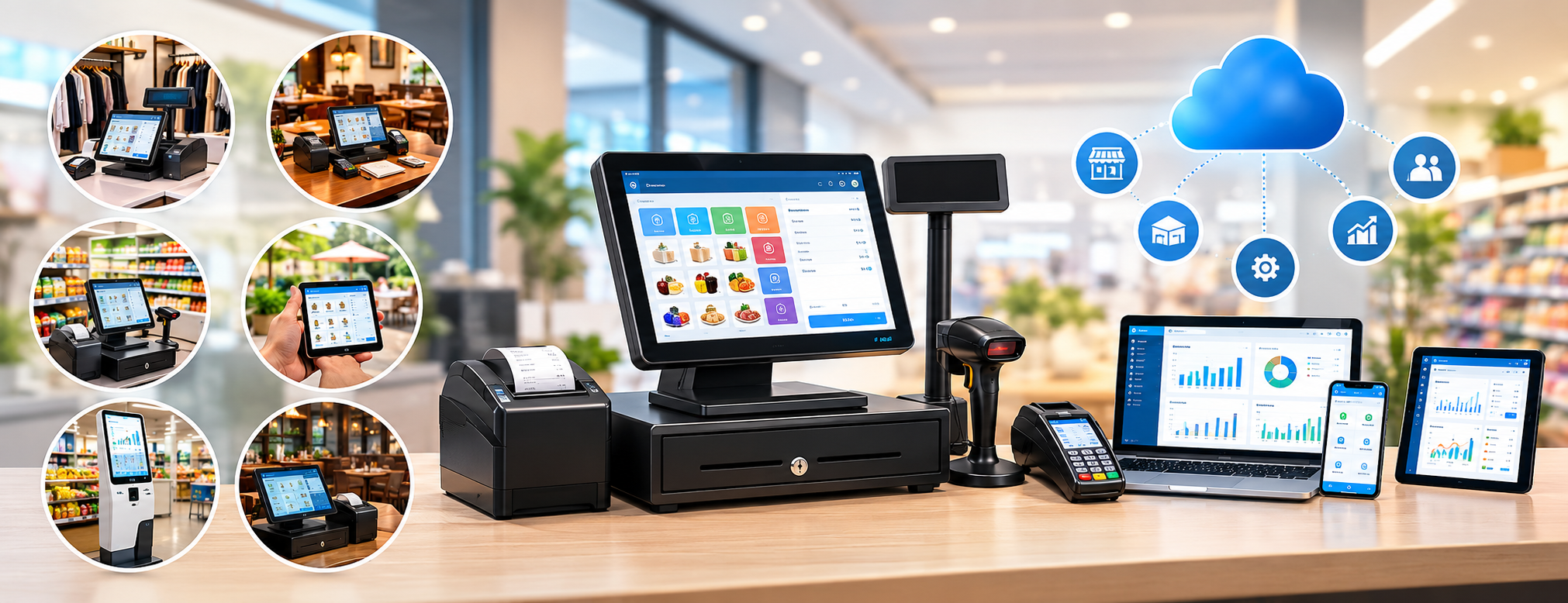
A point of sale may include a set of components, such as:
- POS device.
- Touchscreen display.
- Barcode scanner.
- Receipt printer.
- Cash drawer.
- Customer-facing display.
- Electronic payment acceptance device.
- POS management software.
Therefore, it is best to determine both the software and hardware together based on business requirements and operating methods.
What are the Types of POS Systems?
Cash register systems vary according to the operating method, facility size, and tasks needed to be performed, and they can be classified into the following types.
| Type | Typically Suitable Activities | Key Features |
|---|---|---|
| Traditional Cash Register | Limited and simple activities | Calculating and recording sales value |
| Standalone POS System | Small stores | Executing sales, barcode scanning, and receipt printing |
| Integrated POS System | Stores and supermarkets | Integration of sales, inventory, and accounts |
| Cloud POS | Multi-branch facilities and remote management | Accessing data via the internet |
| Restaurant POS | Restaurants and cafes | Organizing orders, tables, and kitchen |
| Mobile POS | Activities requiring mobility | Operating using a phone or tablet |
| Self-Service System | Certain stores and restaurants | Allowing customers to place orders themselves |

Choosing the most advanced system does not mean it is the best choice in all cases; the right choice is determined according to the facility's needs and workflow mechanism.
1. Traditional Cash Register
The traditional cash register represents the simplest form of sales systems, and its main task is to calculate the value of purchases and determine the amount required to be collected from the customer.
It may be suitable for activities with the following characteristics:
- Business size is extremely small.
- Product selection is limited.
- There is no need for advanced inventory management.
- Operations do not require detailed sales analytics.
With business expansion and an increasing number of products, employees, and suppliers, the capabilities of this type may no longer be sufficient to meet daily requirements.
If you want to track product balances, identify best-selling items, and calculate the value of returns, you may need to upgrade to a point of sale system that offers more advanced functions.
2. Standalone POS System
This type provides additional capabilities that go beyond basic sales calculations, helping employees execute and organize transactions faster through a dedicated sales interface.
Among the functions it can provide:
- Searching for registered items in the system.
- Scanning barcodes to identify products.
- Entering required quantities.
- Applying discounts on sales.
- Choosing the appropriate payment method.
- Creating and printing invoices.
- Processing returns according to specified permissions.
This type suits stores seeking to organize sales operations, but it is essential to verify its integration with inventory and accounts before adoption.
You can learn about the functions of the POS system and the features to verify when evaluating the right solution for your business.
3. Integrated POS System with Accounts and Inventory
This type suits facilities seeking to manage sales operations within an interconnected operating cycle, rather than relying solely on the cash register screen.
When a product is sold, procedures can follow this sequence:
Barcode scanning ← Recording sales ← Issuing invoice ← Determining payment method ← Updating inventory ← Posting data to accounts ← Updating reports
This highlights the importance of integration between the system's various components.
If a cashier uses a independent program, an accountant relies on another program, and inventory data is managed via Excel files, the team will need to re-enter the exact same information in multiple places.
Therefore, linking POS with sales, purchasing, inventory, and accounts helps unify data, with the ability to handle multiple barcodes, units of measurement, and track quantities and costs.
You can review integrated POS solutions to learn how to organize sales operations and link them to other functions.
4. Cloud POS System
Cloud cash registers rely on internet connectivity to access data, allowing users to view it from different locations according to the permissions and capabilities provided by the system.
This option is particularly suitable for facilities whose management needs to:
- Supervise multiple branches.
- Monitor sales movement from outside the facility.
- Operate the system through multiple devices.
- Collect and manage data centrally.
- Review reports without needing to be inside the store.
However, several aspects should be verified before adopting a cloud system, including:
- How business continuity is maintained during poor internet connectivity.
- User account management mechanism.
- Defining permissions for each branch.
- Data storage and protection methods.
- Compatibility with devices used in the business.
Facilities looking for interconnected management of sales, inventory, and accounts can explore available packages and solutions to determine the option that suits their operational needs.
5. Restaurant and Cafe POS System
Restaurant requirements differ from the needs of clothing stores or spare parts shops because the order cycle in a restaurant involves multiple stages before collecting its value.
An order may start from a table inside the restaurant, as a takeaway order, or from delivery service, then move to the kitchen before payment completion.
Therefore, restaurant management systems usually require functions including:
- Table management and arrangement.
- Order registration and tracking.
- Adding options and add-ons to meals.
- Organizing work sections.
- Kitchen operations management.
- Processing indoor and outdoor orders.
- Applying discounts.
- Organizing payment methods.
- Monitoring inventory and recipes.
- Preparing operational reports.
For these needs, you can benefit from the restaurant and cafe management system which helps organize the order and operation cycle to suit the nature of work, rather than settling for a general sales interface.

6. Mobile POS
Not all activities require a sales employee to stand behind a desk or fixed counter, as a phone or tablet can be used to execute transactions in different locations.
Examples of activities that can benefit from this approach:
- Trade exhibitions.
- Events and occasions.
- Certain restaurants.
- Sales representatives' activities.
- Sales kiosks.
- Seasonal retail outlets.
The most prominent advantages of this type are ease of movement and flexibility of use, but before adopting it, one must ensure system compatibility with the devices, printers, and payment methods used in the business.
7. Self-Service POS System
The self-service system allows customers to enter their orders or execute purchase transactions directly through a dedicated screen or device, without requiring an employee to handle every step of the process.
This approach is used in environments such as:
- Fast food restaurants.
- Cafes.
- Large stores.
- Service provision sites receiving large numbers of customers.
This model usually aims to reduce waiting times and provide additional entry points for orders. Its success depends on its suitability to the business, ease of use, and ability to integrate with the main system.
What is the Best POS Type for Retail Stores?
Retail stores mostly need capabilities that go beyond merely recording purchase values, especially when the number of items increases and daily operations multiply.
Therefore, it is preferable to choose a system providing the following functions:
- Barcode reading and handling.
- Inventory balance tracking.
- Recording purchases.
- Supplier data management.
- Executing return operations.
- Managing discounts and offers.
- Supporting various payment methods.
- Defining cashier employee permissions.
- Preparing sales reports.
- Managing multiple branches when needed.
Based on these requirements, an integrated point of sale system may be more suitable than a traditional cash register, especially if the store includes a large collection of products.
It is also important to ensure the system's ability to link sales activity, inventory, and purchasing so management can monitor activity through interconnected data.
What Devices Does a POS System Need?
The devices required to operate a cash register are determined according to the nature of the business and the tasks employees perform during sales.
Required equipment may include:
- POS device.
- Barcode scanner.
- Receipt printer.
- Cash drawer.
- Customer information display screen.
- Scale connected to the POS system.
- Electronic payment acceptance device.
It is best not to purchase hardware before determining the required software and workflow method; choosing the system first helps determine compatible equipment and avoid operational issues resulting from incompatibility.
How to Choose the Right POS System?
Looking at a sales screen design or watching a quick demo is not enough to judge system efficiency. It is better to test an actual sales cycle to ensure all operations work as intended.
You can execute the following steps during testing:
- Add a product to the system.
- Record the product price and its associated tax.
- Test barcode scanning.
- Execute a sale with multiple units.
- Apply a discount to the transaction.
- Test more than one payment method.
- Issue and print the invoice.
- Execute a return operation.
- Verify inventory balance after sales and returns.
- Review the sales report.
- Test permissions granted to the cashier.
- Close the shift and review its results.
- Test handling another branch if the facility includes multiple branches.
After completing these steps, you will be able to evaluate the system's ability to manage daily operations practically, rather than limiting it to issuing invoices.
Ready to try the system?
Start your free trial or talk with the sales team to help you choose the right solution.
What is the Importance of Cashier Permissions?
It is essential that not all employees are able to perform all operations within the sales system; distributing permissions helps organize work and enhance control over transactions.
Cashiers can be allowed to complete sales, while requiring supervisor approval for the following actions:
- Granting high discounts.
- Executing return operations.
- Modifying invoices.
- Deleting transactions.
- Changing product prices.
- Viewing specific reports.
Defining permissions associated with sales, discounts, and returns, while retaining user data when modifying certain transactions, helps improve control and monitor procedures implemented within the point of sale.
What Happens to Data After a Sale is Completed?
One of the fundamental questions to ask before purchasing any cash register system: What happens to data after transaction completion?
Does the process stop at issuing and printing the invoice?
Or is information automatically transferred to related systems and functions, such as:
Inventory ← Accounts ← Customer Data ← Payment Methods ← Profits ← Reports?
The greater the integration between these components, the lower the need for manual processing, and tracking business details becomes much easier.
Therefore, it is important to choose an integrated POS system operating within an interconnected framework with sales, inventory, and accounts, rather than relying on a separate program limited to recording cash register operations.
When Do You Need to Change Your Current POS System?
It may be time to re-evaluate the system in use when the following problems repeatedly occur during work:
- Discrepancy between inventory balances and sales movement.
- Slow cash register screen response.
- Constantly having to enter product data manually.
- Absence of clear user permissions.
- Difficulty processing return operations.
- Inability to track sales of each branch independently.
- Need for Excel files to complete reports.
- Separation of sales data from accounts.
- System incompatibility with required devices.
- Difficulty adding a new branch to the business.
When these problems become a frequent part of daily work, upgrading to an integrated system may be more appropriate than continuing to add separate solutions to the current system.
Common Mistakes When Choosing a POS System
Avoid falling into the following mistakes when comparing systems:
- Choosing the cheapest software without evaluating its functions.
- Purchasing cash register hardware before determining the right software.
- Relying solely on sales screen appearance in decision-making.
- Neglecting inventory management capabilities.
- Failing to test return operations before purchase.
- Skipping barcode scanner testing.
- Not caring about employee permission distribution.
- Overlooking the needs of future branches.
- Using a system customized for restaurants inside a retail store, or vice versa, without ensuring suitability.
- Failing to check reports before system adoption.
The chosen system must comply with the nature of the facility's work and operating method, rather than being limited to issuing invoices.
Ready to try the system?
Start your free trial or talk with the sales team to help you choose the right solution.
Frequently Asked Questions About POS System Types
What are the types of POS systems?
Main types include the traditional cash register, standalone POS system, integrated POS system with accounts and inventory, cloud POS, restaurant systems, mobile POS, and self-service systems.
What is the difference between a cash register and POS?
Cash register may refer to the device used to collect funds or the function responsible for recording sales, whereas POS refers to the point of sale system which may combine software, hardware, product management, payments, inventory, and reporting.
What is the best POS system for stores?
It is preferable to choose a system linking sales with barcodes, inventory, purchasing, returns, payment methods, and reports, especially when the store contains a large selection of products.
Can the cash register be linked to inventory?
Yes, integrated point of sale systems allow updating inventory balances upon recording sales and return operations, according to system settings and transaction processing mechanisms.
Is cloud POS better?
Cloud systems are not necessarily the best choice for all facilities; the decision depends on the number of branches and devices, internet connectivity nature, operational requirements, and management's need to monitor activity remotely.
Is DigitalPro only a cash register program?
DigitalPro is not limited to the cash register function; it combines point of sale with a range of accounting, sales, purchasing, inventory, supplier, and reporting functions, so sales operations work within a broader facility management framework.
Ready to try the system?
Start your free trial or talk with the sales team to help you choose the right solution.
Conclusion
Familiarizing yourself with types of POS systems helps you determine the system matching your needs and avoid choosing a limited solution then having to later purchase additional programs for inventory, accounting, and reporting.
Instead of starting with the question:
What is the best cash register device?
It is better to start with the following question:
What actions should the system execute after recording the sale?
If your activity is limited to recording a limited number of transactions, a simple system may suffice. However, if you manage products, inventory, suppliers, employees, and multiple branches, an integrated point of sale system may provide more suitable capabilities to organize work.
Therefore, you can learn about the POS system to link cash register operations with sales, inventory, purchasing, accounts, and reports, or explore the restaurant and cafe management system if your activity requires organizing orders, tables, and the kitchen.
You can review packages and pricing, then register and get the trial period to test an integrated sales cycle including barcodes, returns, inventory, and reports before making your final decision.
Start Managing Your Business with Complete Flexibility
Try Digital Business for free. Start issuing your ZATCA-compliant electronic invoices within minutes.