
Warehouse Management The Comprehensive Guide to Inventory Organization, Stocktaking, and Cost Reduction
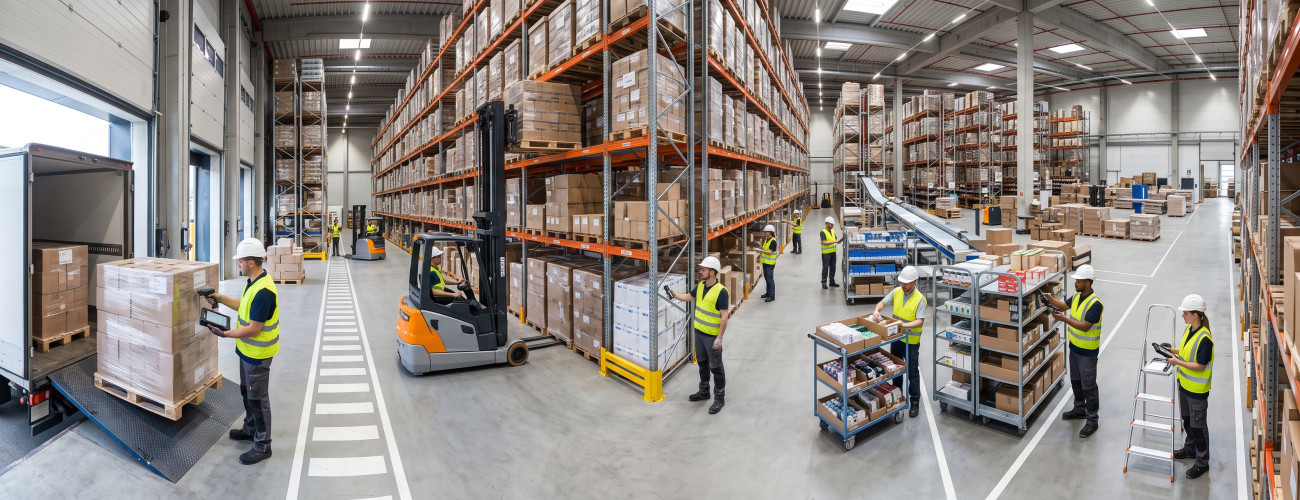
Warehouse management is an essential part of the operational and financial processes in commercial and industrial companies, retail stores, and restaurants; as any defect in recording quantities or receiving, issuing, and inventory operations may result in stockouts of some items, accumulation of slow-moving products, discrepancy between the actual balance and recorded data, or an increase in inventory costs without a clear reason for management.
The concept of warehouse management is not limited to placing and arranging products on shelves, but rather includes an integrated system that starts with estimating needs and ordering goods, then receiving, inspecting, and storing them, and thereafter issuing, transferring, and processing returns, leading up to executing stocktaking, reconciliations, and analyzing item movement.
Therefore, modern facilities need a warehouse management system linked to procurement, sales, point of sale, accounts, and reporting, so that different departments rely on unified data instead of having disparate balances between each department.
To understand the financial aspect of inventory more broadly, you can refer to the Inventory and Procurement Management guide to learn about the importance of tracking inventory levels and movement within business operations.
What is Warehouse Management?
Warehouse management is the set of procedures that organize the receiving, storing, preserving, issuing, and tracking of items within warehouses, while documenting various movements and constantly verifying the compatibility of actual quantities on hand with the balances recorded in the system.
The daily tasks associated with the warehouse typically include the following:
- Receiving purchases.
- Verifying and inspecting items.
- Recording quantities in the system.
- Determining product storage locations.
- Issuing materials and products.
- Transferring items between warehouses.
- Receiving customer returns.
- Managing supplier returns.
- Recording damaged and wasted goods.
- Executing stocktaking operations.
- Processing balance discrepancies with reconciliations.
- Monitoring minimum inventory levels.
- Preparing movement and value reports.
Aamal Raqmia (Digital Business) offers the DigitalPro software as a system that links inventory with sales, procurement, suppliers, warehouses, and reports, reducing the need to run each stage of the inventory cycle through a separate file or program.
You can learn about the Point of Sale and Business Operations Management System to find out how to integrate inventory movement with financial and commercial operations.
What is the difference between Warehouse Management and Inventory Management?
Although the two terms are sometimes used interchangeably, they differ in terms of the scope of work.
Warehouse Management focuses more on the movement of products within the warehouse, and its most prominent aspects include:
- Receiving goods.
- Storing products.
- Locating items.
- Issuing products.
- Making transfers.
- Executing stocktaking.
As for Inventory Management, it deals with the broader picture related to the quantities the facility needs, reorder timing, identifying fast- and slow-moving items, as well as knowing the total value of available inventory.
Simply put:
Warehouse Management = Where are the goods located and how do they move inside the warehouse?
Inventory Management = What quantity do we have, what are our needs, and when do we reorder?
In integrated solutions, both functions complement each other, as DigitalPro offers capabilities to track items, quantities, prices, costs, warehouses, and product movement.
What is the importance of warehouse management for companies?
Organized warehouse management helps the facility strike a balance between maintaining an adequate quantity to meet customer needs and avoiding freezing significant capital in products with insufficient demand.
Its importance is evident in a number of aspects, including:
- Reducing the likelihood of product stockouts.
- Decreasing the accumulation of excess inventory.
- Knowing the actual balance of each item.
- Minimizing damage and waste.
- Detecting stocktaking discrepancies.
- Improving the efficiency of purchasing decisions.
- Speeding up order processing and fulfillment.
- Identifying non-moving items.
- Tracking expiration dates when required.
- Increasing the accuracy of calculating inventory costs.
- Providing data that supports financial reports.
When inventory data is separated from accounting, quantities or values may appear in the warehouse system that do not match the data relied upon by the accountant. Therefore, linking sales, procurement, inventory, and accounts is a more suitable option for commercial activities.
You can review the Procurement and Inventory Management Solutions to understand the relationship between inventory data and associated operations.
What are the stages of warehouse management?
The warehouse management cycle goes through seven interconnected stages that can be organized as follows.
1. Determining Inventory Needs
The inventory management process begins before any goods arrive at the warehouse.
Data that should be taken into consideration includes:
- Currently available balance.
- Average sales or consumption.
- Minimum inventory level.
- Expected demand volume.
- The lead time required by the supplier.
- Quantity to be purchased.
Making a purchasing decision without relying on this data can lead to buying larger quantities than needed or running out of items during periods of high demand.

2. Receiving and Inspecting Goods
Upon arrival of the shipment at the warehouse, a set of data must be verified, such as:
- Product or item name.
- Received quantity.
- Condition and quality of the products.
- Unit of measurement.
- Purchase order.
- Supplier invoice.
- Expiration dates, if applicable.
- Serial numbers for certain products.
After that, the officially accepted items are recorded in the warehouse balance.
The warehouse documentary cycle in Aamal Raqmia relies on documents such as goods receipt note, addition note, inspection and receipt report, and supplier return note to document this stage.
You can refer to the Procurement Management System to learn how to organize operations related to purchasing and receiving.
3. Storing and Organizing Items
After receiving is complete, a clear and appropriate location should be allocated for each product inside the warehouse.
Factors to consider when organizing the warehouse include:
- Nature of the product.
- Item turnover speed.
- Size and weight.
- Storage requirements.
- Expiration date.
- Ease of access to the product.
It is best to place fast-moving items in locations that help reduce preparation time, while isolating damaged products or those still pending inspection to avoid issuing them by mistake.
Defining items, units, and barcodes within the system also helps reduce errors caused by similar product names. DigitalPro offers capabilities to support multiple units and barcodes and to track quantities, prices, and costs.
4. Issuing Products
An item can be issued from the warehouse for several reasons, most notably:
- Completing a sales transaction.
- Transferring it to a branch.
- Using it in production.
- Internal consumption.
- Recording its damage.
- Using it for operational purposes.
It is essential to document the reason for every movement; issuing any product without a document or electronic record can later lead to discrepancies during stocktaking.
In retail stores, the point of sale can be linked to the warehouse so that the quantity decreases upon completing a sale, and returns to the balance upon processing a return that is fit for sale. The Point of Sale System demonstrates this type of integration between sales operations and inventory movement.
5. Transferring Between Warehouses and Branches
Facilities that operate through more than one branch need to record the product's transfer from the sending location to the receiving location.
The transfer process is supposed to include the following data:
- The originating warehouse.
- The destination warehouse.
- The transferred item.
- The transferred quantity.
- Date of the transaction.
- The user who executed the transaction.
- Transfer receipt status.
It is not recommended to adjust the balances of the two warehouses manually, because the transfer process should be an independent movement that can be tracked and referred to during auditing.
Modern inventory management systems include capabilities for transferring between warehouses and branches and tracking the item's path from purchase to sale.
For activities that rely on product distribution, you can learn about the Distribution and Item Movement Management System.
6. Managing Returns and Damages
Returning a product to the warehouse does not necessarily mean it is fit for resale.
Therefore, the status of the returned product must be determined by knowing whether it is:
- Resalable.
- Damaged or defective.
- In need of inspection.
- To be returned to the supplier.
Likewise, damaged products must be recorded and not removed from the balance without documenting the reason for the movement.
Separating the movements of returns and damages helps form a more accurate picture of available quantities, as well as the causes that lead to losses.
7. Stocktaking and Reconciliations
Stocktaking means comparing the quantities actually present in the warehouse with the balances recorded in the system.
For example:
If the system shows 500 units of a specific item, while the physical count shows 487 units, this means there is a discrepancy of 13 units, and its causes must be investigated before recording the reconciliation.
The discrepancy may result from one of the following reasons:
- An unregistered invoice exists.
- A return was not added.
- Unrecorded damage.
- An error during goods receipt.
- An error in the issuing process.
- A transfer between warehouses that was not fully recorded.
- Entering a quantity incorrectly.
Aamal Raqmia provides practical explanations for stocktaking and warehouse reconciliations within DigitalPro, including handling quantity and cost discrepancies resulting after stocktaking.
For practical application, you can take advantage of Book Your Consultation to learn about the mechanism for managing stocktaking and reconciliations within the system.
What is the warehouse documentary cycle?
The warehouse documentary cycle is a set of documents and procedures that prove every entry, exit, transfer, or adjustment movement occurring on the inventory.
Among the most prominent documents used are:
| Process | Probable Document |
|---|---|
| Receiving goods | Receipt / Addition Note |
| Issuing an item | Issue Note |
| Transfer | Warehouse Transfer Note |
| Supplier return | Return Note |
| Customer return | Addition/Return Note |
| Damage | Damage Report |
| Stocktaking | Stocktaking Report |
| Stocktaking discrepancy | Reconciliation Note |

The value of the documentary cycle stands out when a discrepancy in the balance appears and the person in charge needs to know the reason that led to the change in the quantity of an item.
Why did the balance of this item change?
When the system can display the document associated with the movement, its date, the user who executed it, and the type of transaction that changed the balance, the auditing process becomes faster, more accurate, and reliable.
What are the types of stocktaking in warehouse management?
The facility can choose the stocktaking method that suits the size of its inventory and the nature of its activity.
Periodic Stocktaking
This type of stocktaking is carried out at specific time intervals, such as:
- Monthly.
- Quarterly.
- Annually.
During this, the actual items on hand are counted and then the results are compared with the balances recorded in the system.
Perpetual Stocktaking
The inventory balance is updated with every purchase, sale, issue, or transfer movement, while continuing to perform physical stocktaking operations at intervals to ensure the accuracy of the recorded balances.
Aamal Raqmia's content regarding restaurants indicates the difference between periodic and perpetual stocktaking, where inventory movement in perpetual stocktaking changes simultaneously with purchase, sale, transfer, and waste operations.
Selective Stocktaking
This method relies on selecting a specific number of items to perform stocktaking on, instead of examining the entire contents of the warehouse.
Priority in selection can be given to:
- High-value items.
- Fast-moving products.
- Items with frequent stocktaking discrepancies.
What are the most important warehouse management reports?
Effective warehouse management is not complete without reports that help those in charge understand the inventory status and make appropriate decisions.
Among the most prominent reports that management needs are:
- Available balance for each item.
- Total inventory value.
- Item movement details.
- Items that have reached low levels.
- Slow-moving or non-moving products.
- Fast-moving items.
- Procurement data.
- Returns data.
- Transfer movements.
- Damages data.
- Stocktaking discrepancies.
- Movement of each warehouse separately.
- Item costs.
Aamal Raqmia offers an explanation of warehouse reports in DigitalPro, along with the smart reports portal that provides tools to track sales data and financial indicators within a single platform.
You can learn about the Digital Sender and operations-related reports among the available solutions for data and report management.
What are the most important performance indicators in inventory management?
A set of numerical indicators helps in discovering problems early, before they turn into significant losses.
Inventory Turnover Ratio
This indicator shows how quickly inventory is sold or consumed over a specific time period.
Products remaining for long periods without movement may indicate freezing a part of capital in inactive inventory.
Stockout Rate
When there is frequent unavailability of an in-demand item, this could be an indicator of poor purchase planning or setting the minimum inventory level incorrectly.
Stocktaking Discrepancy Ratio
It is calculated by comparing the recorded quantity in the system with the quantity actually found.
If discrepancies are frequent for a specific item or within a specific warehouse, it is better to search for the operational cause rather than just making a reconciliation.
Damage and Waste Ratio
This ratio can be tracked through:
Damage Value ÷ Inventory Value or Usage during the period
A high ratio may reveal problems in storage, handling, or expiration tracking.
Item Dwell Time
Calculating the number of days a product remains in the warehouse helps identify stagnant items, and thus making a decision regarding promoting them or reducing their purchase quantities.
How do you determine the minimum inventory level?
The minimum inventory level represents the threshold at which you should consider reordering the item before it reaches the stockout stage.
It is not recommended to determine this level randomly, but rather a set of factors must be considered, including:
- Average demand.
- Lead time.
- Changes in sales volume.
- Seasons.
- Supplier delay probabilities.
Example:
If your average sales are 10 units daily, while the supplier needs 7 days for the shipment to arrive, the specified minimum quantity should be able to cover the expected demand during the lead time, with the addition of a safety margin suitable for the nature of the activity.
Inventory guidelines published by Aamal Raqmia explain the importance of setting safe inventory levels and using low-quantity alerts to reduce the likelihood of shortages or excesses.
Ready to try the system?
Start your free trial or talk to our sales team to help you choose the right solution.
How is warehouse management linked to procurement?
Inventory and procurement cannot be treated as two separate processes, as each directly affects the other.
Purchasing decisions should be based on data such as:
- Current balance on hand.
- Reserved quantities.
- Minimum inventory level.
- Consumption rate.
- Expected demand.
- Lead time.
- Supplier performance level.
When procurement management is separated from inventory data, an employee might order a quantity that is already available or delay purchasing an item that is nearing stockout.
That is why systems like DigitalPro Cloud provide functions to manage procurement and inventory and track sales and reports within an interconnected environment.
Companies needing online access to the system can learn about the Procurement and Inventory Management Solutions.
How is warehouse management linked to accounting?
Inventory does not merely represent a quantity of products, but possesses a financial value that affects the business results of the facility.
Therefore, the accountant needs to know:
- Purchases value.
- Inventory cost.
- Cost of sales.
- Returns value.
- Damaged items value.
- Ending inventory value.
If the quantities recorded in the system are inaccurate, this may reflect on the inventory value and the financial reports based on it.
This is why Aamal Raqmia demonstrates that DigitalPro includes an accounting system linked to procurement, sales, and warehouses, instead of running these departments separately.
You can also learn about Integrated Management and Accounting Solutions to understand how financial and administrative operations are linked within the system.
What is the role of barcodes in warehouse management?
Using barcodes helps identify items much faster and reduces reliance on typing the product name or number manually.
It can be utilized in:
- Receiving products.
- Executing sales.
- Locating the item.
- Performing stocktaking.
- Transfer operations.
- Preparing orders.
The effectiveness of barcodes increases when each item and unit has a clear definition within the system, especially in facilities dealing with thousands of products.
DigitalPro offers barcode support, multiple units, and linking products to point of sale and inventory.
How does warehouse management differ according to the activity?
Retail Stores and Supermarkets
These activities require a set of tools, including:
- Barcodes.
- Points of sale.
- Real-time quantity updates.
- Offers and discounts.
- Returns management.
- Stocktaking.
- Tracking expiration dates for some products.
Therefore, it is important for inventory to be directly connected to the POS system instead of relying on a separate database.
Distribution Companies
They have a greater need to manage:
- Multiple warehouses.
- Transfers between locations.
- Suppliers.
- Customers.
- Sales orders.
- Order processing.
- Fast- and slow-moving items.
- Warehouse reports.
Facilities that rely on these operations can benefit from the Distribution and Warehouse Operations Management System.
Factories
Tracking inventory becomes increasingly important in factories to include:
- Raw materials.
- Manufacturing supplies.
- Work-in-progress products.
- Finished products.
- Waste.
- Issues dedicated to production.
Restaurants and Cafes
Inventory management in this activity requires greater accuracy; because the product being sold is often a meal, while the inventory balance consists of ingredients and raw materials.
When selling a single meal, it may be necessary to reduce the quantities of several ingredients from inventory rather than deducting just one item.
You can learn about the Restaurant and Cafe Management System that links point of sale to inventory and operations related to the nature of restaurants.
Ready to try the system?
Start your free trial or talk to our sales team to help you choose the right solution.
What are the most significant warehouse management mistakes?
There is a set of mistakes that can cause inventory discrepancies or lead to losses, most notably:
- Delaying the recording of inventory movements.
- Receiving products without verifying them.
- Allowing the issue of items without a document.
- Multiple employees using the same account.
- Not configuring user permissions.
- Leaving periodic stocktaking unmonitored.
- Directly changing balances instead of recording a reconciliation.
- Not isolating damaged items from sound ones.
- Not monitoring stagnant products.
- Purchasing quantities without checking the available balance.
- Neglecting to record returns.
- Failing to link inventory to POS and accounts.
- Using non-unified measurement units.
In many cases, stocktaking is not the source of the problem, but rather the operations that took place during the month and were not properly recorded at the time they occurred.
How do you choose a warehouse management program?
The best warehouse management program is one that documents the movement of each item and links inventory with procurement, sales, returns, accounts, and reports.
Before choosing a system, verify the availability of the following functions:
- Managing multiple warehouses.
- Defining products and items.
- Unit management.
- Barcode support.
- Determining product cost.
- Transfer between warehouses.
- Returns management.
- Recording damages.
- Executing stocktaking.
- Making reconciliations.
- Setting minimum inventory.
- Managing user permissions.
- Item movement reports.
- Integration with POS.
- Linking to accounts.
DigitalPro offers functions to track inventory, products, suppliers, and warehouses, along with sales, returns, and financial and accounting reports.
That is why you can try DigitalPro for Accounts, Inventory, and Point of Sale Management on an actual cycle that starts from purchasing and extends to sales, stocktaking, and reconciliation.
How does DigitalPro help in warehouse management?
DigitalPro connects inventory to the rest of the business components instead of treating it as a department separate from other operations.
Functions offered by the Aamal Raqmia website include:
- Defining products.
- Tracking quantities.
- Price and cost management.
- Multiple unit support.
- Using barcodes.
- Tracking expiration dates.
- Supplier management.
- Warehouse management.
- Sales management.
- Procurement management.
- Processing returns.
- Points of sale.
- Financial and accounting reports.
This interconnection means that a sales or purchase operation can reflect on inventory, accounts, and reports from the system itself, instead of re-entering data in multiple places.
Aamal Raqmia's website also provides separate training materials on stocktaking, reconciliations, and warehouse reports, to help users implement the inventory cycle within the system.
Book your consultation to learn about the appropriate solution for managing inventory operations.
Frequently Asked Questions about Warehouse Management
What is meant by warehouse management?
It is organizing the operations of receiving, storing, issuing, transferring, and stocktaking items within warehouses, along with documenting movements and comparing actual quantities with the balances in the system.
What is the difference between warehouse and inventory?
A warehouse is the place or unit where products are kept, while inventory refers to the products or materials owned by the facility at a specific time.
What are the most important tasks of warehouse management?
Its tasks include receiving and inspecting goods, storing, issuing, transferring, managing returns, executing stocktaking and reconciliations, monitoring quantity levels, and preparing reports.
What is the warehouse documentary cycle?
It is a set of documents that prove item movement, such as receipt note, issue note, transfer note, return note, stocktaking report, damage report, and reconciliation note.
How is warehouse stocktaking done?
First, the actual quantity present for each item is counted, then compared with the balance recorded in the system. After that, the causes of discrepancies are investigated before recording the required reconciliations.
What is a warehouse management program?
It is a digital system used to record items, quantities, and purchase, sales, transfer, returns, and stocktaking movements, while providing reports that help track the inventory status.
Must warehouses be linked to accounts?
Linking is important for commercial activities; because inventory movement affects the cost of sales, inventory value, and financial reports, and integration also contributes to reducing repetitive data entry.
Can multiple warehouses be managed in one program?
Advanced systems allow the management of several warehouses, executing transfers between them, and tracking the balance of each location. DigitalPro and DigitalPro Cloud offer functions for managing inventory and warehouses within the sales and accounting ecosystem.
How do I know I have a problem in inventory management?
Among the most prominent signs are frequent discrepancies in stocktaking, product stockouts despite expected demand, accumulation of stagnant items, a high value of damages, discrepancies between warehouse and accounting data, or difficulty in knowing the real balance quickly.
Conclusion
The success of warehouse management relies on controlling the product's path entirely, starting from purchase order and receipt, then storage, issuing, transfer, and sales, and ending with returns management, stocktaking, and reconciliations.
The goal is not to keep the largest possible quantity of products, but rather to have the right quantity of the right product at the right time and place, with the ability to track the movement of each item and know its cost and balance.
As the facility expands and the number of items and branches increases, relying on manual files becomes more prone to problems, and the need grows for a system that combines procurement, inventory, sales, POS, accounts, and reports within a single database.
DigitalPro from Aamal Raqmia offers an integrated system to manage these operations, with functions to track items, warehouses, suppliers, returns, stocktaking, and reports, alongside accounts and points of sale.
You can review the Packages and Pricing, or learn about DigitalPro for Accounts, Inventory, and Point of Sale Management, then Register and Get the Trial Period to test the inventory cycle starting from the purchase invoice through to sales, stocktaking, and reconciliation.
Start Managing Your Business with Complete Flexibility
Try Aamal Raqmia for free. Start issuing your ZATCA-compliant electronic invoices within minutes.