
Electronic Invoicing Software
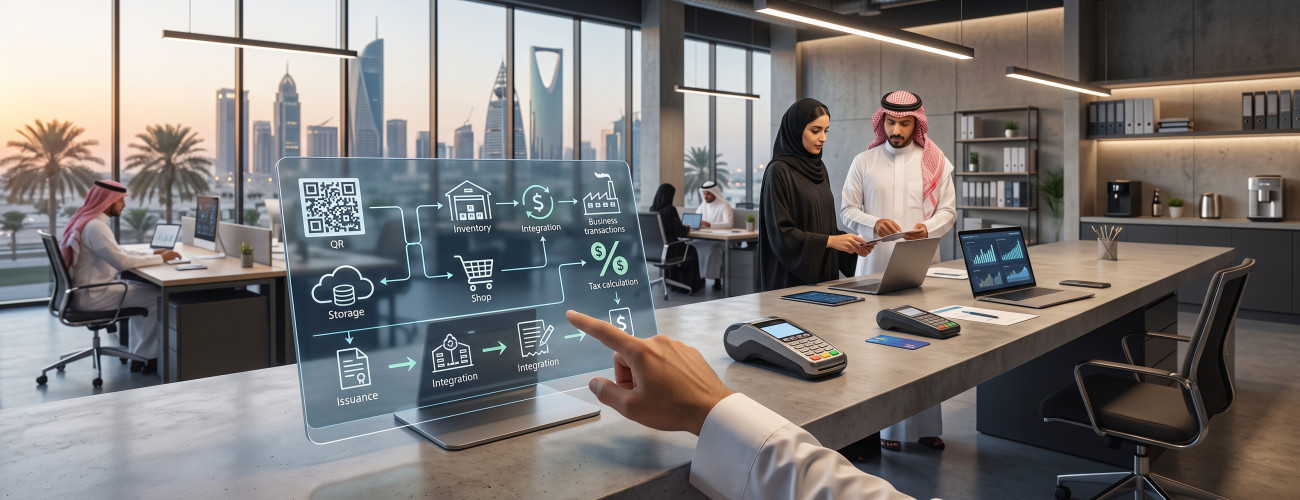
Choosing an electronic invoicing software in Saudi Arabia is no longer limited to issuing an invoice containing a QR code. The facility needs a system capable of creating invoices and notices electronically, calculating value-added tax (VAT), saving documents, and dealing with the integration requirements with the "Fatoora" platform when the facility is subject to the second phase.
The Zakat, Tax and Customs Authority (ZATCA) clarifies that an electronic invoice is an invoice that is issued and saved in a structured electronic format through an electronic system. Therefore, a handwritten invoice or a scanned document is not considered an electronic invoice.
Consequently, your search for the software should not be limited to the ability to print the invoice layout. Instead, it is better to choose an integrated system that links invoices with sales, customers, inventory, payments, accounts, and reports.
You can learn about the basics of electronic invoicing first through the Electronic Invoicing Guide in Saudi Arabia.
What is E-Invoicing Software?
E-invoicing software is a technical solution dedicated to creating, saving, and processing electronic invoices and notices in compliance with the tax and technical requirements applicable to the facility.
Its task is not limited to recording the customer's name and transaction value, as the integrated system can handle a range of elements, including:
- Facility information and Tax Identification Number (TIN).
- Customer data.
- Products and services.
- Value Added Tax (VAT).
- Tax invoice.
- Simplified tax invoice.
- Credit and debit notes.
- QR code.
- Payment methods.
- Return operations.
- Saving invoices.
- Sending a copy of the invoice or sharing it with the customer.
- Integration with accounts and inventory.
- Integration with the Fatoora platform when phase two applies.
ZATCA indicates that electronic invoicing relies on two main types of invoices: the tax invoice, which is mostly used in B2B transactions, and the simplified tax invoice, which is usually used when selling to the final consumer.
To understand the differences between the two types more clearly, you can view the Tax Invoice Guide in Saudi Arabia.
What should the e-invoicing software provide?
To evaluate the software properly, it is better to examine the integrated workflow it offers rather than focusing solely on the invoice's appearance and design.
Issuing Tax and Simplified Invoices
The software should be capable of issuing the appropriate type of invoice for the nature of the transaction, entering the necessary data correctly.
The needs of a store dealing mostly with the final consumer may differ operationally from the needs of a company providing its services to other businesses.
Calculating Value Added Tax (VAT)
It is important for the system to handle tax calculation based on product and service settings, detailing:
- Price value before tax.
- Tax percentage.
- Tax amount.
- Discounts.
- Total due.
However, the software does not prevent errors resulting from incorrect tax classification setup, so products and services should be configured properly from the beginning.
To learn more about handling tax comprehensively, you can refer to the Value Added Tax Guide in Saudi Arabia.
Managing Returns and Notices
When returning part of an order or needing to correct an invoice's value, the facility should not rely on deleting the original invoice and issuing another one manually.
An integrated system needs to provide clear management for:
- Credit note.
- Debit note.
- Full return.
- Partial return.
- Linking the correction process to the original invoice.
Aamal Raqmia provides these functions among the important criteria to consider when choosing accounting software compatible with electronic invoicing.
You can view details related to choosing the system through the article Choosing an Accounting System Compatible with Electronic Invoicing.
Does the e-invoicing software need to be integrated with ZATCA?
This does not apply in the same way to all facilities, as it depends on the phase the facility is subject to.
The first phase of electronic invoicing, known as the generation and storage phase, was launched on December 4, 2021. The second phase, regarding integration, started on January 1, 2023, and is being implemented gradually on groups of taxpayers.
When the facility enters the second phase, the e-invoicing solution must integrate with ZATCA systems, issuing invoices according to the formats and technical requirements specified by the Authority.
Among the most prominent requirements the software should handle during the integration phase:
- Connecting the invoicing system to the Fatoora platform.
- Setting up invoice generation units.
- Generating XML files in compliance with the requirements.
- Creating a UUID.
- Applying sequencing and counters for invoices.
- Generating a QR Code according to phase requirements.
- Clearing the standard tax invoice.
- Reporting the simplified tax invoice.
- Receiving acceptance, warning, and rejection statuses.
When the integration notification reaches your facility, you can benefit from the Second Phase of Electronic Invoicing Guide to understand integration requirements.
Must the e-invoicing software be certified by ZATCA?
This point is one of the most confusing matters when comparing e-invoicing software options.
ZATCA clarifies that a taxpayer can benefit from e-invoicing services provided by any company offering an electronic system, provided the system used complies with e-invoicing requirements.
The Authority also clearly indicates that the list of solution providers published by them is an indicative and non-binding list, and does not mean the Authority certifies the technical solutions themselves.
Therefore, do not make the word "certified" the sole factor when comparing software. Instead, ask the service provider how they implement the actual requirements applicable to your facility.
What is the difference between invoicing software and integrated accounting software?
Simple invoicing software primarily focuses on creating the invoice and saving its data, while integrated accounting software links the invoice to workflows and other operations within the facility.
| Dedicated Invoicing Software | Integrated Accounting System |
|---|---|
| Issuing invoices | Issuing invoices |
| Customer information | Customer accounts |
| Tax | Tax and reports |
| Payment methods | Receipt and payment vouchers |
| Retaining the invoice | Accounting posting |
| Limited inventory capabilities | Inventory and warehouse management |
| Invoicing reports | Financial statements and reports |

When recording a sales invoice through the integrated system, its impact can simultaneously reflect on:
- Customer balance.
- Sales revenue.
- Output tax.
- Inventory.
- Payment method.
- Reports.
- Accounting entry.
This is why business owners with inventory, POS operations, or a large volume of transactions tend to use an integrated system instead of relying on a standalone invoicing software.
Is DigitalPro suitable as an e-invoicing software?
Aamal Raqmia offers DigitalPro as a system that combines accounts, points of sale, inventory, reports, and e-invoicing functions, making the invoice part of the sales and accounting ecosystem rather than an isolated document.
The functions provided by the system include:
- Sales and purchases management.
- Customers and suppliers management.
- Inventory management.
- Point of Sale (POS).
- Support for multiple payment methods.
- Returns management.
- Accounting and financial reports.
- Sales and profit analysis.
- Products and warehouses management.
You can check out the Accounting and POS System if you want to link invoice issuance with accounts, inventory, and POS instead of relying on a standalone invoicing software.
If working online is your priority, you can also explore the Cloud Accounting System.
How to choose the best e-invoicing software?
Before making a subscription decision, ask to actually test the following operations within the system:
1. Create a tax invoice
Check for the presence of:
- Facility data.
- Customer data.
- Tax Identification Number (TIN).
- Products.
- Tax.
- Total.
2. Create a simplified invoice
Verify the system's ability to correctly handle sales to final consumers and the specific requirements for the applicable invoice.
3. Execute a return
Do not just test the sales process; try returning a product or modifying an invoice's value using the appropriate note.
4. Review the integration status
If your facility is included in the second phase, inquire about the following:
- Does the system display the invoice acceptance status?
- Do warnings appear?
- Does it clarify the reason for rejection?
- How can the user resolve the error?
5. Review the accounting impact
After issuing the invoice, verify the transaction's reflection on:
- Customer account.
- Inventory.
- Revenues.
- Tax.
- Payment method.
- Reports.
6. Test permissions
Not all permissions should be available to every user, such as the ability to:
- Edit prices.
- Apply discounts.
- Cancel transactions.
- Create returns.
- View profits.
What are the common mistakes when choosing an e-invoicing software?
Do not make the invoice design the primary factor upon which you base your software choice.
Among the most prominent mistakes to avoid:
- Believing that a regular PDF file alone fulfills e-invoicing requirements.
- Neglecting to test the second phase requirements.
- Not ensuring support for simplified invoices.
- Skipping the test for return operations.
- Failing to verify XML generation and integration when the facility is subject to phase two.
- Not knowing the mechanism for processing rejected invoices.
- Overlooking the software's integration with inventory and accounts.
- Not testing the permissions system.
- Relying on the phrase "Certified by ZATCA" without verifying actual compliance.
- Choosing a solution that is not scalable with branches and POS.
ZATCA requirements clarify that the electronic invoice must be generated from an electronic system and in a structured format, and the integration phase adds technical requirements that go beyond the external appearance of the invoice.
Frequently Asked Questions about E-Invoicing Software
What is the best e-invoicing software?
The best software is the one that matches the nature of the facility's activity, can issue the necessary types of invoices, supports VAT, returns, and notes, in addition to meeting the integration requirements when the facility is included in the second phase.
Is e-invoicing software mandatory?
Persons subject to the Electronic Invoicing Regulations must issue and store invoices using an electronic solution according to the phase applicable to them. The generation and storage phase began on December 4, 2021, while the integration phase is being implemented gradually on targeted groups.
Is Excel considered e-invoicing software?
Preparing the invoice manually using document editing tools or relying on an image or scanned copy is not enough, as the invoice must be issued and saved through an electronic system and in a format compliant with applicable requirements.
Does the software need a QR Code?
Details differ according to the invoice type and the phase applicable to the facility, but the QR code is an important element in the simplified tax invoice, and the second phase includes additional technical requirements related to it.
Does e-invoicing software require the internet?
The system's operation method upon connection loss may vary depending on the solution used, the invoice type, and the applicable phase; therefore, the software provider should be directly asked about the mechanism for issuing, storing, and resending invoices after the connection is restored.
What is the difference between an electronic invoice and a tax invoice?
The term "tax invoice" specifies the invoice type and its tax content, while the word "electronic" refers to the method of issuing, saving, and processing the invoice. Accordingly, a tax invoice can be electronic if issued from an electronic system according to the specified requirements.
How do I integrate the e-invoicing software with ZATCA?
If the facility is within the target group for the second phase, invoice generation units are set up and the electronic solution is linked to the Fatoora platform according to the Authority's technical procedures and requirements. You can benefit from booking a consultation on electronic invoicing to get the appropriate steps.
Conclusion
Choosing the right e-invoicing software should not start with the invoice format, but rather with the nature of the workflow the facility wants to manage.
The appropriate solution is supposed to help in issuing tax and simplified invoices, calculating tax, handling returns and notes, storing data, and implementing integration requirements with the Fatoora platform when the facility is in the second phase.
If your business relies on sales, inventory, customers, and points of sale, it is better for the invoice to be part of an integrated accounting system rather than using independent invoicing software and then transferring data manually to accounts.
Aamal Raqmia offers an accounting and POS system that links invoicing with sales, inventory, payments, and reports within a single system, in addition to cloud solutions and specialized systems for various activities.
You can review the packages and prices, then register and get a free trial to test a sales invoice, return, simplified invoice, and reports before deciding on the final system.
Start managing your business with total flexibility
Try Aamal Raqmia for free. Start issuing your ZATCA-compliant electronic invoices within minutes.